# Audit log
> **What this chapter covers**
> What is recorded, why it keeps accumulating on lower tiers, and why only admins
> can read it.
## You have to be able to answer
One day after rollout these questions arrive.
```
"Where did this number come from?"
"Who opened that document?"
"Why did usage double last month?"
```
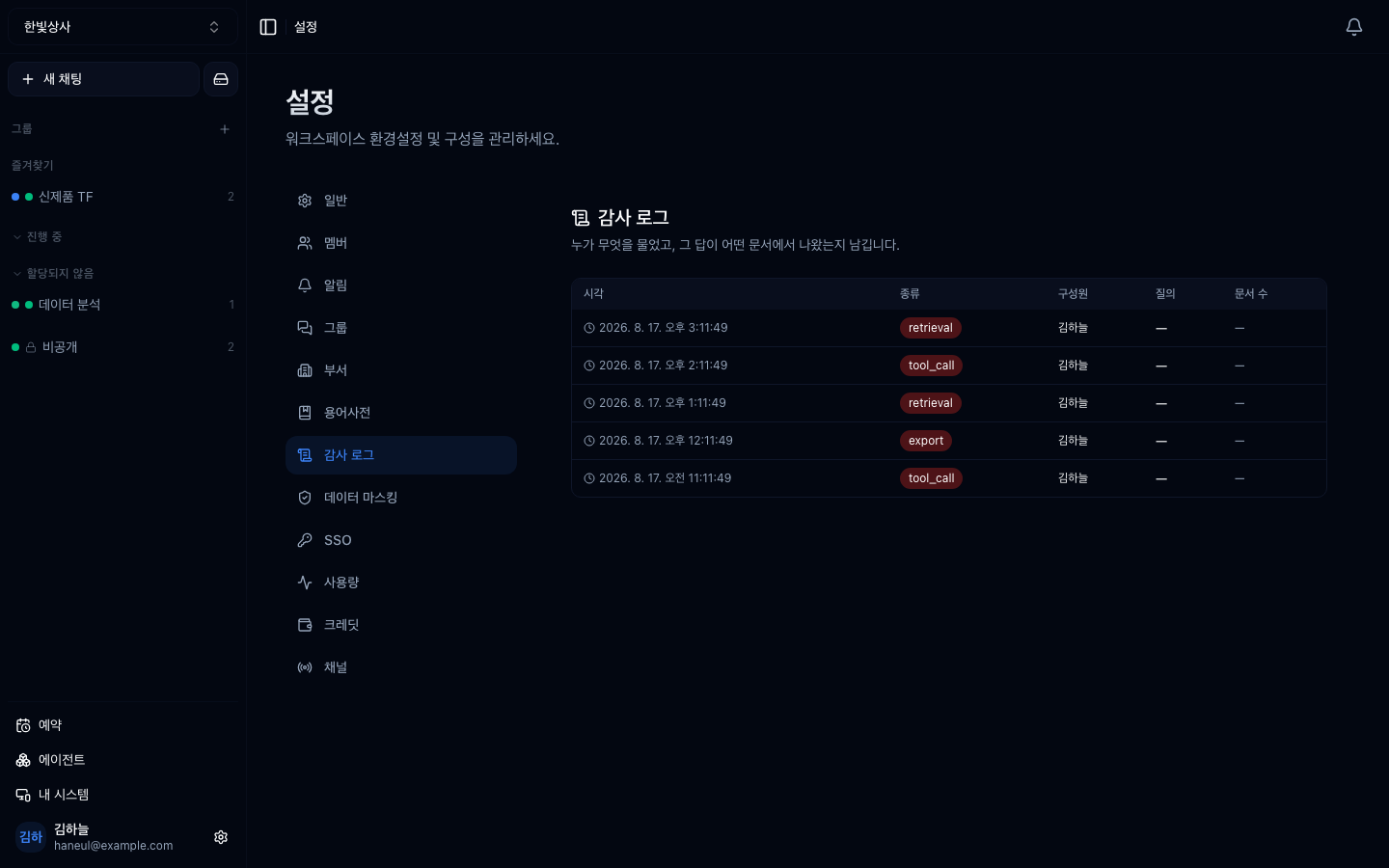
**Settings → Audit log** is where the answers live.
## What is recorded
| Column | Meaning |
|---|---|
| Time | When |
| Kind | `retrieval`, `tool_call`, `export` and so on |
| Member | Who — a person or a service call, distinguished |
| Query | What was asked |
| Documents | How many were attached as grounding |
A **most-cited documents** list comes with it. That is more useful for operations
than for audit — it shows what the team actually leans on.
## Collection runs regardless of tier
This is the core of the design.
> **Collection always runs. The tier only shortens the viewing window.**
| Tier | Window |
|---|---|
| Free, Starter | Screen locked (records still accumulate) |
| Pro | 30 days |
| Business | 365 days |
If collection stopped, an upgrade would only show data **from the upgrade
onwards** — so "what happened during last year's incident?" could never be
answered, and the reason to have an audit log disappears. That is why the locked
screen says **"available on a higher tier"** rather than "no records".
## Admins only
**The audit log is itself a disclosure path** — raw queries and document names sit
in it. So only owners and admins can open it; members do not even see the menu.
This is a question that comes up in [security review](/guide/cn-security): "who can
read the audit trail?" needs an answer.
## What it is for
| Use | How |
|---|---|
| **Incident investigation** | Which document did the wrong answer come through |
| **Compliance** | Evidence for [high-impact AI](/guide/ax-compliance) documentation |
| **Improvement** | Frequently cited documents, frequently failing queries |
| **Cost** | Which work consumes usage (alongside [usage](/guide/cn-usage)) |
## It is not the whole story
This log records **what happened inside this product**. Tracing a whole agent
system needs tree-shaped execution records, which is a separate topic —
[Audit trails and observability](/guide/ax-audit-trail).
## Common misunderstandings
### "On the free tier nothing is recorded, right?"
**It is recorded.** It just isn't visible. Upgrade later and that period appears.
### "Doesn't personal data end up in the audit log?"
**Raw queries are stored, so it can.** That is why reading is limited to admins. If
queries in your workspace routinely contain personal data, turn on
[masking](/guide/cn-masking) as well.
---
## Check yourself
**1. Why do records accumulate on lower tiers?**
Answer
**So the past is visible after an upgrade.** Stopping collection would show only
from the upgrade onwards, making old incidents impossible to investigate.
**2. Why is the audit log admin-only?**
Answer
**Because raw queries and document names are in it, making the log itself a
disclosure path.**
**3. What is the most-cited documents list for?**
Answer
**It shows what the team actually leans on.** More useful for operations than
audit — if that document goes stale, every answer goes stale with it.
---
Reconstruct last week from the log alone. Thirty minutes →
[Reconstruct a week from the audit log](/guide/cn-try-audit-log)