# Channels — the ways in
> **What you will learn**
> What channels group together, and which of the four suits which situation.
## A channel is an entrance to an agent
So far you have talked **from the workspace screen.** But in practice there are
people who never come to that screen.
- Customers have no account in your workspace
- Field staff only use email
- Other systems are not people
**Channels are the doors those people and systems come through.**
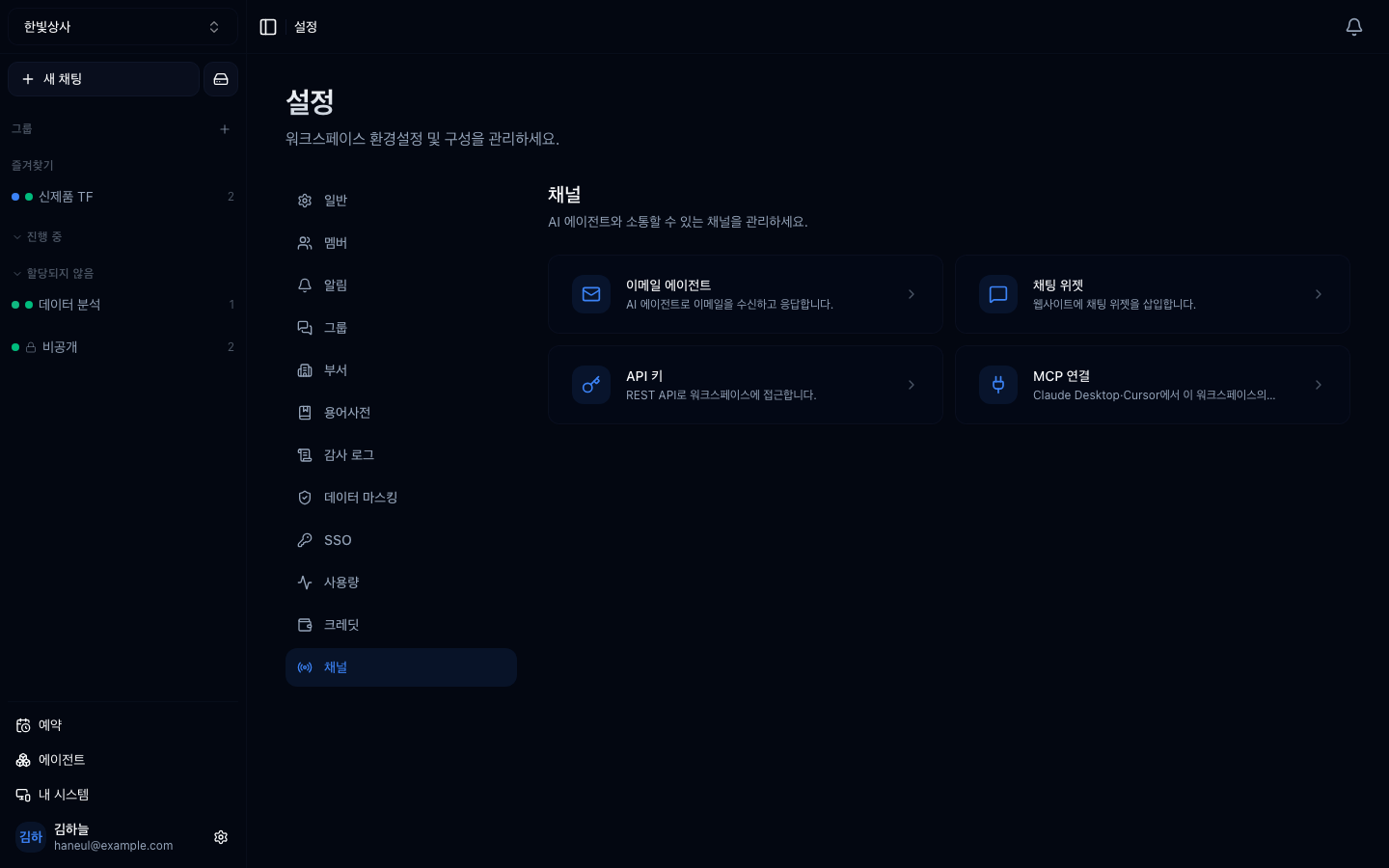
## The four
They are collected under **Settings → Channel settings.**
```mermaid
graph TD
A["Channels"] --> B["Email agents
send mail, get a reply"]
A --> C["Chat widget
embedded in your site"]
A --> D["API keys
another system calls in"]
A --> E["MCP
attach or lend tools"]
```
| Channel | Who uses it | Chapter |
|---|---|---|
| **Email agents** | people who only use email | [Email agents](/guide/cn-email-agents) |
| **Chat widget** | visitors to your site | [Chat widget](/guide/cn-chat-widget) |
| **API keys** | other systems and scripts | [Calling it via API key](/guide/cn-api) |
| **MCP** | external tools / external AI | [Connecting an MCP server](/guide/cn-mcp) |
> **The API docs are documentation, not a channel.** They are not in the channel
> list; you reach them from **a link inside the MCP screen.**
## Why they are grouped together
Because they are all **paths from outside into the workspace.**
That matters because **they share a security character.**
```
□ who can come in
□ which agent they reach
□ which tools they can use
```
Opening any channel makes you decide those three. The
[tools are permissions](/guide/mcp-security) perspective applies at the entrance
too.
## Shared settings
Of the four, email and the widget have almost identical settings.
| Setting | Meaning |
|---|---|
| Handling agent | which [sub-agent](/guide/cn-agents-intro) handles requests from here |
| Default group | which [thread group](/guide/cn-groups) results land in |
| Usable tools | the tools permitted on this channel only |
| Extra instructions | instructions that apply only here |
| Model | which model |
| On/off | to close it temporarily |
**Always narrow "usable tools."** This is a path in from outside, so having every
workspace tool open is dangerous.
## Which channel to open
```mermaid
graph TD
Q["Who is coming in?"] --> A{"On your team?"}
A -->|"yes"| B["No channel needed
the screen is enough"]
A -->|"no"| C{"A person?"}
C -->|"person · email"| D["Email agent"]
C -->|"person · web"| E["Chat widget"]
C -->|"a system"| F["API key"]
```
**Team members need no channel.** Channels exist for people without accounts and
for systems.
## Before opening one
```
□ what material do requests from this channel reach
□ is it acceptable for an outsider to see that material
□ have you narrowed the tools
□ have you restricted who can send (email and widget both have restrictions)
```
**The second is the key one.** If internal documents are connected to the
workspace, opening a channel makes them material for answering outside
questions.
---
## Check yourself
**1. What do the four channels have in common?**
Answer
They are all **paths from outside into the workspace.** That gives them the same
security character, so opening any of them makes you decide who comes in, which
agent they reach, and which tools they can use.
**2. Why do team members not need a channel?**
Answer
**Because they can come in through the workspace screen.** Channels exist for
people without accounts — customers, external contacts — and for systems.
**3. Why narrow the tools when opening a channel?**
Answer
**Because it is a path in from outside.** With every workspace tool open, an
external request can use all of them.
---
Email first → [Email agents](/guide/cn-email-agents)