# Glossary
> **What this chapter covers**
> Why search misses your company's words, what to register, and how this connects
> to [masking](/guide/cn-masking).
## What search misses
An agent answers by [finding material and attaching it](/guide/ai-grounding). But
people ask using **different words** from the ones in the documents.
```
The document says: "inventory turnover"
The person asks: "why did ITR drop?"
→ same thing, and search cannot connect them
```
**The glossary is the table that ties them together.**
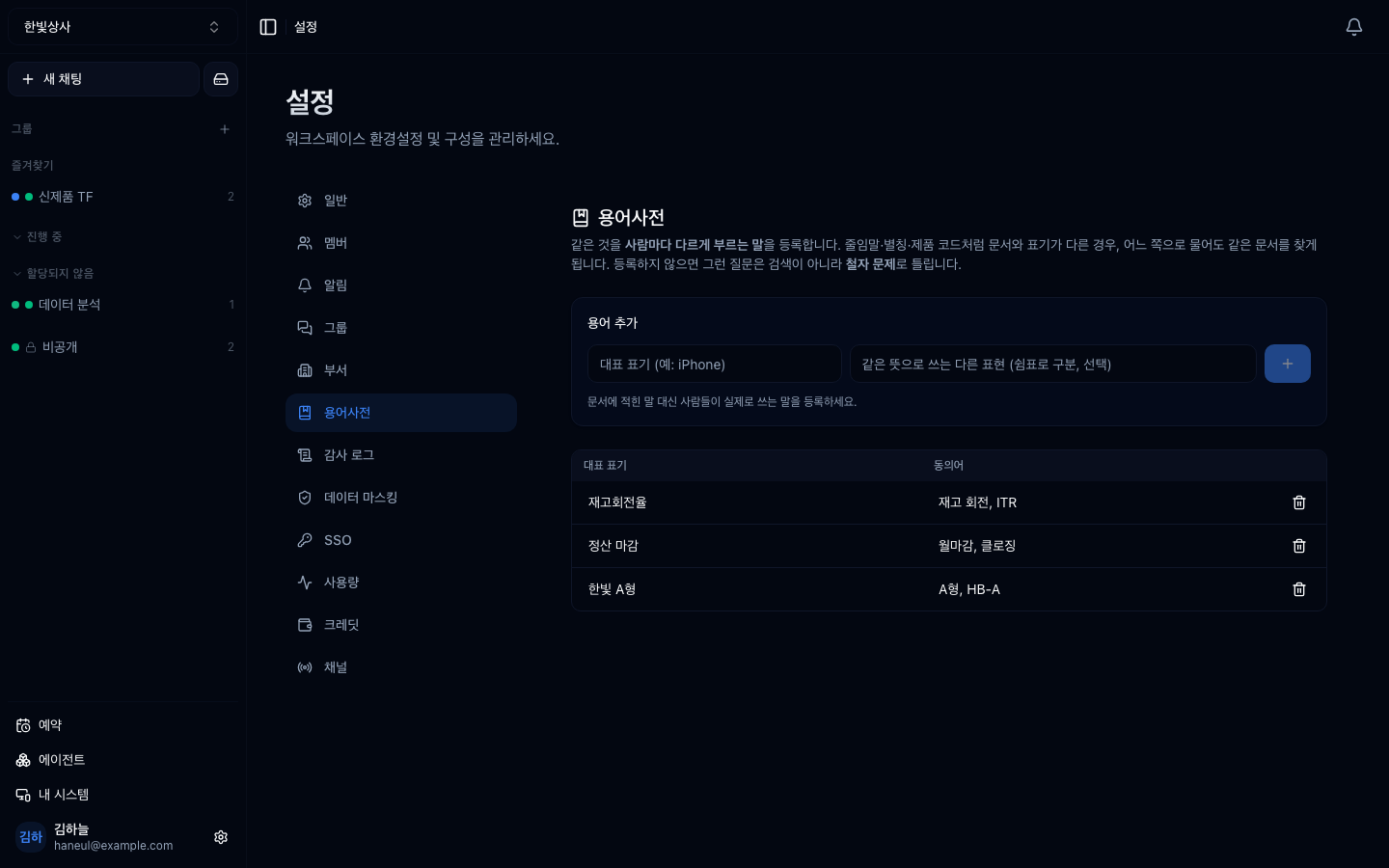
## One canonical form, many aliases
| Canonical | Aliases |
|---|---|
| Inventory turnover | inventory turn, ITR |
| Hanbit type A | type A, HB-A |
| Month-end close | monthly close, closing |
**Make the canonical form the words that actually appear in documents.** Aliases
are what people actually type — they don't have to be pretty. The closer they are
to a typo, the more they are worth.
> **An alias belongs to one term only.** Adding one already used elsewhere tells
> you which term has it and refuses. The same abbreviation meaning two things
> makes search worse, not better.
## What to register first
Running the intake interview **by department** is fastest — each department has
its own abbreviations, which is also why this screen sits next to
[departments](/guide/cn-groups).
```
□ things people call by different names (monthly close / closing / month-end)
□ products that appear only as codes (HB-A / Hanbit type A)
□ metrics said as English abbreviations (ITR / inventory turnover)
□ internal-only shorthand (NP-TF / new product task force)
```
**"The word search keeps missing" is the best candidate** — people have already
felt the pain, so the effect is visible immediately.
## Everyone reads, admins edit
Looking up "what does this abbreviation mean" is normal daily use. Block reading
and nobody learns the glossary exists. **Only editing is narrowed to admins.**
## It feeds masking
Turning on **"mask glossary terms"** in [data masking](/guide/cn-masking) hides
these words on their way to the model.
> Phone numbers and ID numbers are caught by patterns, but **customer names and
> product codes are not.** Those differ per workspace, so they cannot live in
> code. The glossary is that list.
So this screen does two jobs at once — it **makes search work**, and it becomes
**the list of words that must not leave**.
## No tier limit
The glossary works on every tier. Features that make the product stick are worse
off locked ([Plans and tiers](/guide/cn-plans)).
## Common misunderstandings
### "How many should we add?"
**Twenty is enough to see the effect.** Don't try to finish it in one sitting.
Adding a line each time a search misses is the healthy way for it to grow.
### "Two departments use the same abbreviation differently"
**Better not to register it.** Merging them breaks search for one of them. Fix the
documents to use distinct canonical forms instead.
---
## Check yourself
**1. How does the glossary help search?**
Answer
**It ties the words people type to the words documents use.** Asking about "ITR"
finds documents that say "inventory turnover".
**2. Why can't one alias belong to two terms?**
Answer
**Because one abbreviation meaning two things makes search worse.** Adding an
alias already in use tells you where it is and refuses.
**3. Why does masking need the glossary?**
Answer
**Customer names and product codes cannot be caught by patterns.** They differ per
workspace, so they cannot live in code — the glossary is that list.
---
Next, the security part → [One page for security review](/guide/cn-security)