# Data masking
> **What this chapter covers**
> What gets hidden, why tokens rather than deletion, and why people can still see
> the original.
## Swapped on the way out
Switch on **Settings → Data masking** and it applies to **every message and
document excerpt** leaving this workspace.
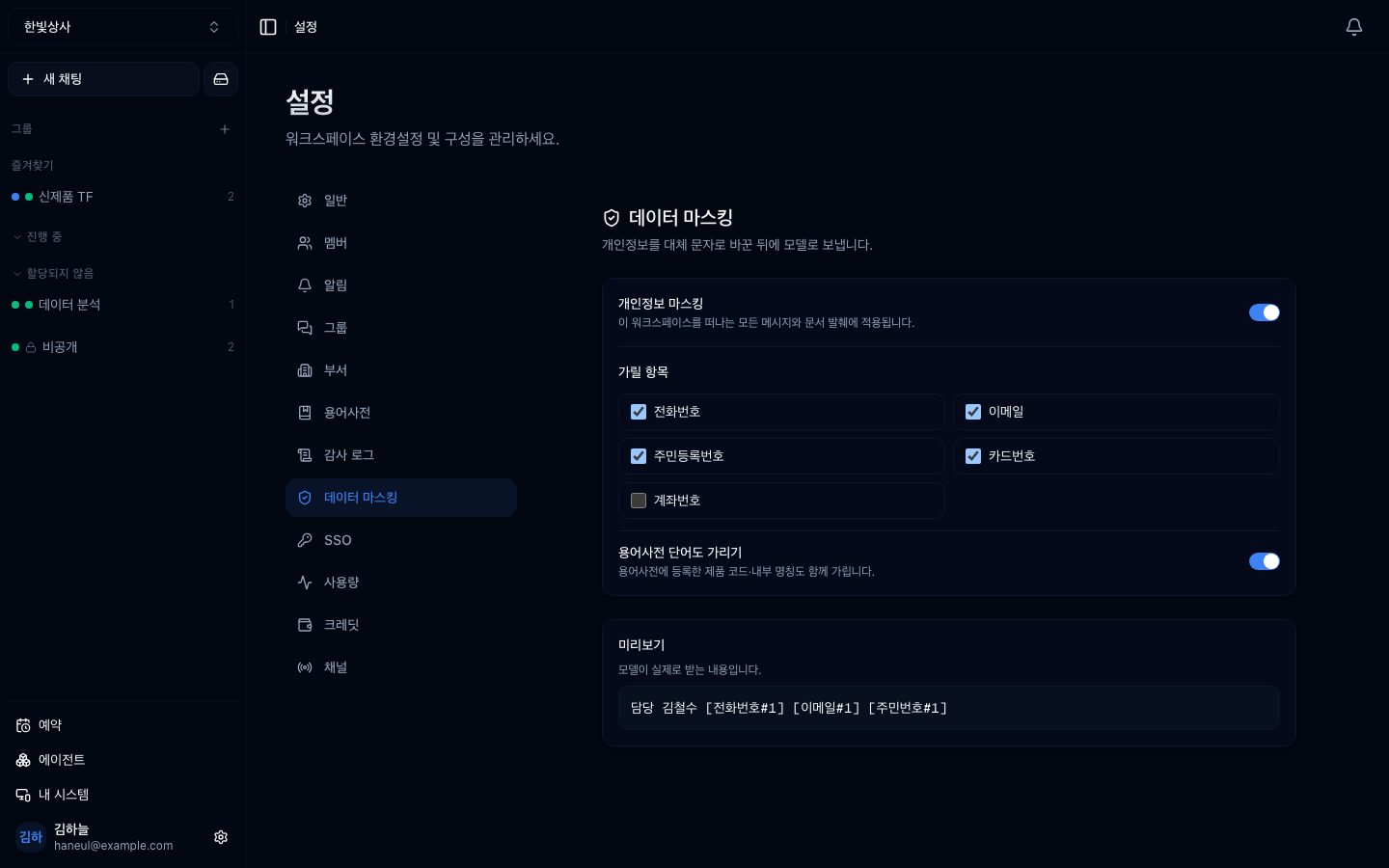
```
Original: Contact Kim 010-1234-5678 chulsoo@hanbit.co.kr
The model gets: Contact Kim [phone#1] [email#1]
```
## Why tokens instead of deletion
Flattening to `[REDACTED]` **breaks the sentence so the model cannot read
relationships.**
```
✓ "[customer#1] supplies [customer#2]" → the relationship survives
✗ "[REDACTED] supplies [REDACTED]" → no information at all
```
And **the same value always gets the same token.** If "Acme" becomes
`[customer#1]` in one place and `[customer#2]` in another, the model reads two
different companies.
## Choose what to mask
| Item | How it is caught |
|---|---|
| Resident registration no. | Pattern |
| Card number | Pattern |
| Phone number | Pattern |
| Bank account | Pattern |
| Email | Pattern |
| **Glossary terms** | Words registered in the [glossary](/guide/cn-glossary-terms) |
**The last row is half of this feature.** Customer names, product codes and
internal names cannot be caught by patterns — they differ per workspace, so they
cannot live in code. The glossary is that list.
> If a phone pattern matched an ID number first, the tail would survive. So **more
> specific rules are checked first** — the order you tick the boxes doesn't matter.
## Use the preview
The **preview** at the bottom shows "what the model actually receives" and updates
as you tick items. **Look at it before switching this on.**
## People still see the original
The most common misreading.
> **Masking hides things from the model, not from people.**
The substitution dictionary is kept, so authorised users can be shown the original.
Hiding things from people is a job for
**[visibility and permissions](/guide/cn-security)** instead.
## Tier
A Business-tier feature ([Plans and tiers](/guide/cn-plans)). On lower tiers the
screen is locked — but what is locked is the policy screen, not your data.
## Where to switch it on
Everywhere is not the right answer.
| Workspace | Recommendation |
|---|---|
| Customer support, HR, legal | On |
| Anything with external intake (widget, email) | On |
| Internal engineering and planning | Usually unnecessary |
**Masking is not free.** The model never sees the real values, so work that has to
handle the values themselves — validating a phone number format, say — cannot be
done in a masked workspace. Split those into their own workspace.
## Common misunderstandings
### "Does masking make us compliant?"
**No.** It closes one path to the model. Lawful basis, retention periods and
deletion procedures all remain ([Regulation and compliance](/guide/ax-compliance)).
### "Is personal data inside documents masked too?"
**Drive excerpts take the same path.** The original file is untouched though, so
anyone who downloads it gets the raw text. That is a
[drive permissions](/guide/cn-drive) question.
---
## Check yourself
**1. Why tokens rather than deletion?**
Answer
**The sentence structure has to survive for the model to read relationships.**
"[customer#1] supplies [customer#2]" keeps the relationship; two `[REDACTED]`s
carry nothing.
**2. How do you mask a customer name?**
Answer
**Register it in the glossary and turn on "mask glossary terms".** Patterns cannot
catch it, and the value differs per workspace so it cannot live in code.
**3. Does masking hide things from teammates?**
Answer
**No.** It hides things from the model. Hiding from people is visibility and
permissions.
---
Next, what gets recorded → [Audit log](/guide/cn-audit)