# Connecting an MCP server
> **What you will learn**
> How to read Connect's MCP connection screen, the difference between the two
> directions, and what to check before attaching.
## The screen
Under **Settings → Channel settings → MCP** you find this workspace's MCP address and client
configuration.
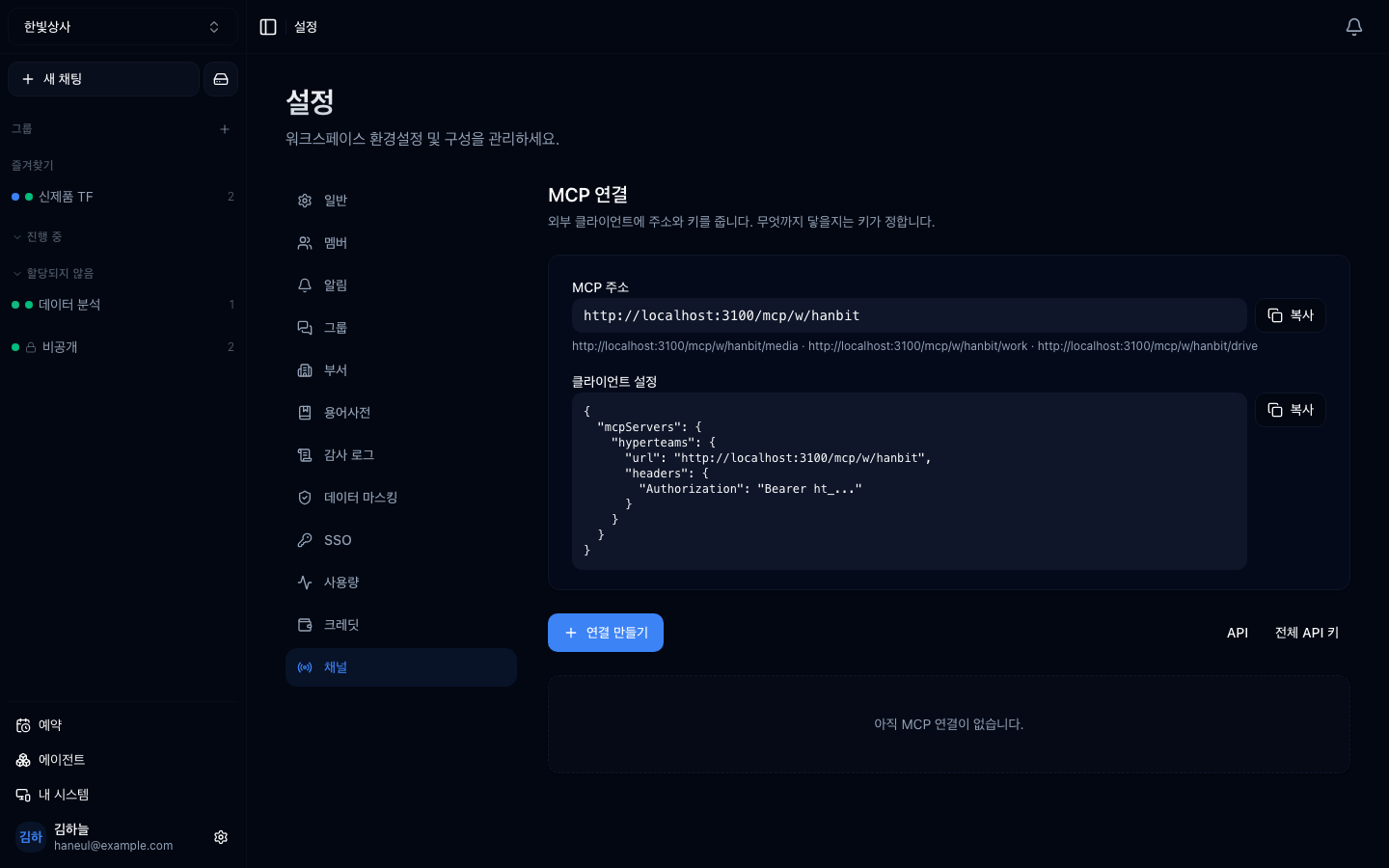
## Two directions
This is the easy part to confuse. **A connection has two directions.**
```mermaid
graph TD
E1["External client
Claude Code etc."] -->|"outside-in"| C["Connect workspace"]
C -->|"inside-out"| E2["External MCP server
GitHub · Slack · internal DB"]
```
### Outside-in — using Connect as a tool
**An external MCP client uses this workspace as a tool.**
Copy the **MCP address** and **client configuration** from the top of the screen
and paste them into that client.
```json
{
"mcpServers": {
"hyperteams": {
"url": "https://.../mcp/w/",
"headers": { "Authorization": "Bearer ht_..." }
}
}
}
```
**This gives you**: the ability to use this workspace's material and tools from
Claude Code.
### Inside-out — attaching external tools
Use **Create connection** to attach an external MCP server to the workspace.
Attached tools appear in [the agent list](/guide/cn-agents-intro) as **`APP`.**
**This gives you**: the ability to use GitHub, Slack and the like from workspace
conversations.
## Which one do you need?
| What you want | Direction |
|---|---|
| Query the internal DB from a conversation | inside-out |
| Use this workspace's material from Claude Code | outside-in |
| Let the whole team work with GitHub issues | inside-out |
**Most of the time it is inside-out.**
## Before attaching — tools are permissions
The four checks from [tools are permissions](/guide/mcp-security), applied here
in practice.
```
□ How far does this server reach
→ the permission on the token you issue is the answer
□ Are there irreversible actions
→ does it include delete, send, or payment
□ Can human approval be inserted into those
→ if not, the right call is not to attach that tool
□ Where do the credentials live
→ never paste them into a conversation
□ Would you notice if the server changed
→ the server announces the tool list. Record it as it stands today
```
### Issue narrow tokens
Take GitHub: when creating a token you choose its permissions.
```
✗ all repositories · full read and write
✓ this project's repository · issues, read only
```
**Start with least privilege and widen when needed.** Granting wide and
narrowing later rarely actually happens.
## After attaching — tidy the tools
One MCP server brings in several tools. A single GitHub server can bring 25.
**You do not have to leave them all on.** Because
[accuracy falls as tools multiply](/guide/mcp-too-many-tools), keep only what
this workspace actually uses. The next chapter's subject.
## Managing credentials
| Do not | Instead |
|---|---|
| Paste a key into a conversation | enter it on the connection settings screen |
| Share the address and key in chat or issues | only with the people who need it |
| Leave unused connections in place | tidy them up |
**If a key leaks**, revoking it at the issuer (GitHub and so on) and issuing a
new one is the fastest fix.
---
## Check yourself
**1. What are the two directions of an MCP connection?**
Answer
**Outside-in** is an external client (Claude Code and the like) using this
workspace as a tool; **inside-out** is attaching an external MCP server to the
workspace to use in conversation. Most of the time it is the latter.
**2. What is the principle when issuing a token?**
Answer
**Least privilege.** Grant only what is needed now and widen later. Granting wide
and narrowing later rarely happens in practice.
**3. Why not leave every tool on after attaching an MCP server?**
Answer
**Because more tools make it harder for the model to pick the right one**, and
they fill the context. Keeping only what you actually use helps accuracy.
---
Start with the one people attach most — a database →
[Connecting a database](/guide/cn-database)