# Scheduled — stack it up, hand it to the clock
> **What this chapter covers**
> How to stack requests and run them in order, how to hand that to the clock, and
> how to pause and cancel.
## Two screens became one
The **queue** and **schedules** used to be separate screens. They were the same
table underneath and only the URLs were parent and child, but users saw two
things. Worse, "queue" already meant two different things in this product.
| What the word meant | Name now | Where |
|---|---|---|
| Work the machine runs in order | **Scheduled** | Sidebar → Agents |
| Work **a person must approve** | Pending approval | [Pending approval](/guide/cn-approvals) |
Now there is one word — **scheduled**. The old addresses (`/queue`,
`/queue/schedules`) redirect here.
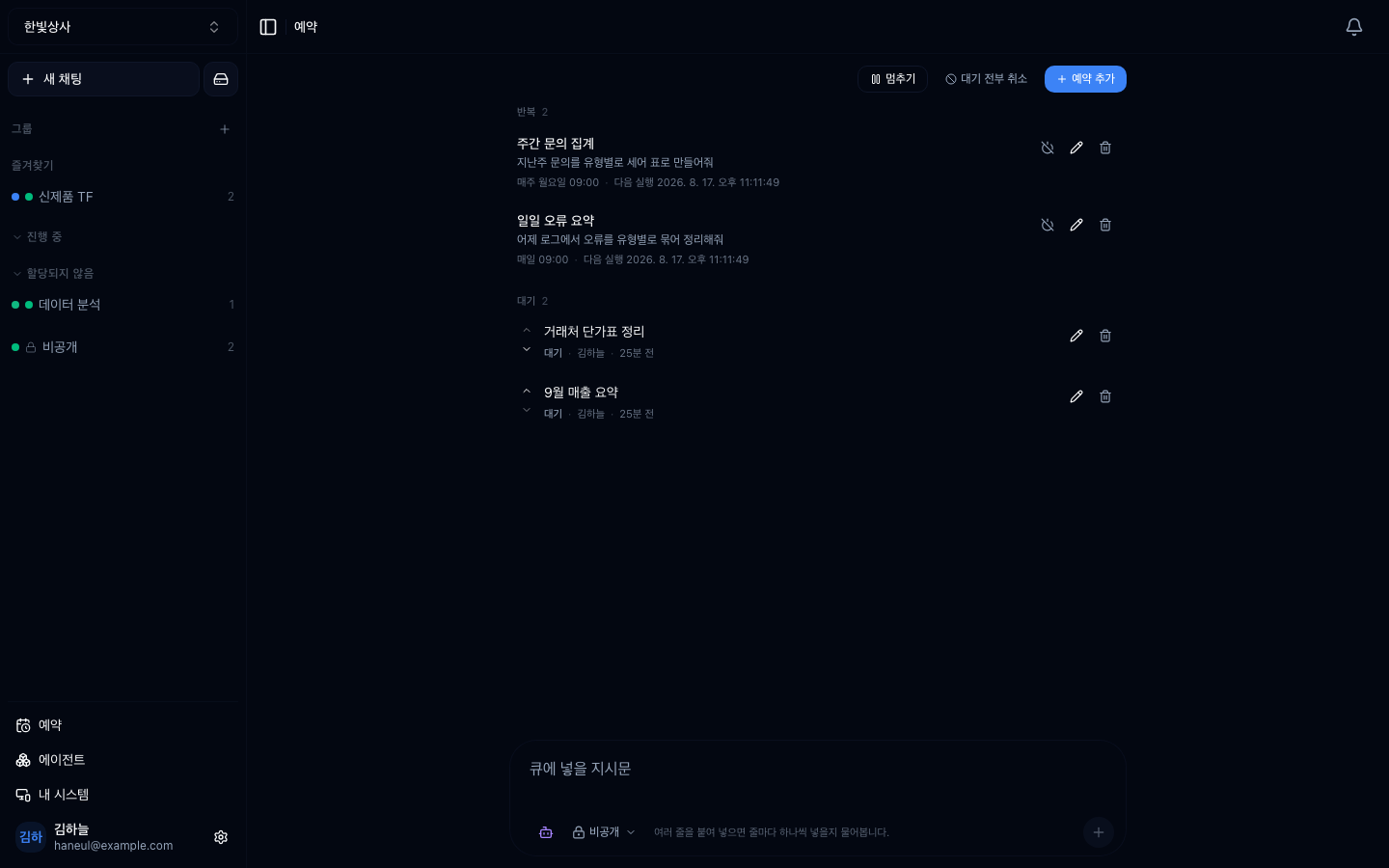
The top half is **repeats** (things that run on a cycle); the bottom half is
**waiting** (things that run once).
## Waiting — things to do once
Type into the box and press enter. **Paste several lines and it asks whether to
add one per line** — pasting a to-do list straight in is the normal use.
```
You arrive in the morning with five things on your mind
→ paste five lines and walk away
```
**They do not run at the same time.** The next item starts only when the previous
conversation has finished.
| | Several threads | Scheduled queue |
|---|---|---|
| Execution | At the same time | **One at a time, in order** |
| What you do | Start each one | Stack them and leave |
| When to use | Unrelated work | Order matters, or you want to throw it all in at once |
> **If the items are unrelated and you want them fast, open several threads
> instead.**
## Repeats — things to hand to the clock
Pick the cycle from a list. The screen and the [`/every` command](/guide/cn-shortcuts)
read the **same table**, so "daily" is the same hour whichever way you make it.
| What you pick | Actual cycle |
|---|---|
| Hourly | On the hour |
| Daily | 09:00 |
| Evening | 18:00 |
| Weekly | Monday 09:00 |
| Friday | Friday 18:00 |
| Monthly | 1st at 09:00 |
For anything else, write the cron expression yourself (`0 9 * * *`). Cycles from
the list show by name; ones you wrote show as the expression.
**Last run and next run are shown together.** If those two numbers surprise you,
that is the signal — in particular, an hourly repeat whose run takes 90 minutes
falls further behind every hour.
## Pausing and cancelling
This part is new.
| Button | What it does |
|---|---|
| **Pause** | Stops the whole queue. Newly added items do not run either |
| **Resume** | Releases the pause |
| **Cancel all waiting** | Cancels everything waiting at once. **Leaves what is running** |
> **Items keep stacking up while paused.** A notice sits at the top of the screen,
> and adding an item tells you so again. This is the button to reach for when you
> spot trouble — pausing is easier to undo than deleting.
Each item can be **edited, deleted, retried, or moved up and down**. When you
retry a failed item, **say what was missing.** Retrying unchanged fails the same
way.
## Each item can override the defaults
| Setting | Meaning |
|---|---|
| Agent | The [sub-agent](/guide/cn-agents-intro) that handles this request |
| Model | Which model |
| Group | The [conversation group](/guide/cn-groups) the result lands in |
| Visibility | Workspace-visible or private |
| Excluded tools | Tools to withhold for this request |
| Drive scope | Which material it may read |
**You do not have to set any of them.** Unset means the workspace default.
## Turn one conversation into a repeat
From a conversation's header, **"make this a repeat"** opens the scheduled screen
with that conversation's prompt, agent, model, tools and scope **already filled
in**. The only thing left to choose is the cycle.
> The moment you want a repeat is usually **right after seeing a good result**.
> Show a blank form then and nobody does it.
## Designing for when nobody is watching
```
□ Does the prompt say what to do on failure?
□ Does it say "do nothing and report" when the material is missing?
□ Does it contain anything irreversible (sending, publishing)?
```
**Doing nothing beats being wrong.** Nobody is watching, so a wrong result goes
out as-is.
## How this differs from HyperTeams schedules
| | Connect scheduled | [HyperTeams schedules](/guide/ht-schedule) |
|---|---|---|
| Where it runs | Cloud | Your computer |
| What it does | Creates a workspace conversation | Works in a task folder |
| Touches files? | No | **Yes** |
| If the computer is off | Still runs | Does not run |
> **If files must change, HyperTeams. If it reads and summarises material,
> Connect.**
## Housekeeping
```
□ Turn off repeats whose purpose has ended — projects finish, their repeats do not
□ Check items with piled-up failures — they may have been failing for days
□ Compare cycle against run time — a run longer than the cycle falls behind forever
```
## Common misunderstandings
### "Does pausing delete my schedules?"
**No.** Items stay and new ones keep arriving while paused. Resuming picks up
where it left off. Only "delete" and "cancel all waiting" remove anything.
### "Does cancel-all stop what is running?"
**No.** A running item finishes. Cutting it off mid-way leaves a half-built
result behind.
---
## Check yourself
**1. How does the scheduled queue differ from opening several threads?**
Answer
**The queue runs one at a time in order**; several threads run at once. The
queue's benefit is not speed — it is that **you can stack work and walk away**.
**2. What is the first button to press when you spot trouble?**
Answer
**Pause.** The whole queue stops and newly added items do not run. Pausing is
easier to undo than deleting.
**3. What matters when you retry a failed item?**
Answer
**Saying what was missing.** Retrying unchanged fails the same way.
---
Set one running and make it fail on purpose. Twenty-five minutes →
[Set one schedule running](/guide/cn-try-queue)