# Connecting a system
> **What you will learn**
> What a system is, the two registration steps, how to handle the token, and
> where free ends and paid begins.
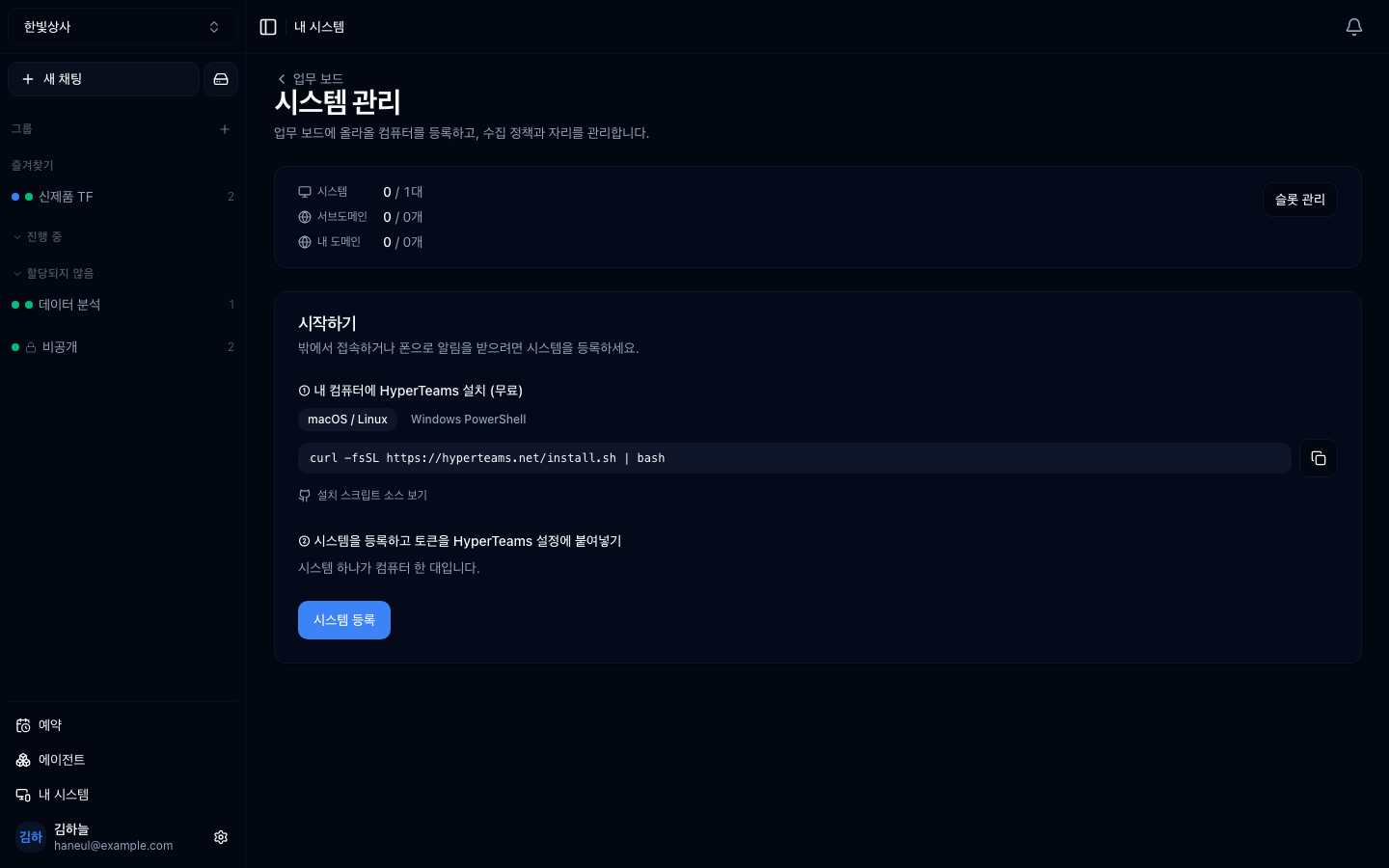
Registered machines appear alongside **slot capacity**. `0 / 1` is machines in
use against available slots, with the subdomain quota beside it.
## A system is one registered machine
Connect lives in the cloud, and sometimes the actual work has to happen on files
on your machine. A **system** is the registration unit that bridges the two.
> **One system is one computer.**
```mermaid
graph TD
U["Team member · browser"] --> C["Connect
the cloud"]
C --> S["System
one registered machine"]
S --> H["HyperTeams
running on that machine"]
H --> F["Real project folders"]
```
If [the HyperTeams track](/guide/ht-what-is-it) is the story from that machine's
side, this chapter is **registering that machine from Connect's side.**
## Registering
Go to **My systems** in the workspace menu and it walks you through two steps.

### Step 1 — install HyperTeams on that machine
Run the command shown **on the machine you are connecting.**
```bash
curl -fsSL https://hyperteams.net/install.sh | bash
```
There is a separate Windows PowerShell tab. Details in
[installing](/guide/ht-install).
### Step 2 — register the system and paste the token
> **Only the workspace owner can do this step.** Signed in as an admin you can
> see the system list but there is **no Register system button.** See
> [the role table](/guide/cn-members).
Press **Register system** and a system row is created in this workspace along
with a **token.** Paste that token into HyperTeams' settings on the machine and
they connect.
## The token is a password
> **This single `tt_` token is access to that machine.**
```
✗ pasting it into a chat room
✗ leaving it in an issue or a document
✗ including it in a screenshot
✓ only in that machine's settings screen
```
**If it leaks**, deleting the system and registering again is fastest. A new
token is issued and the old one is invalidated.
## What registering gives you
| Screen | What you see |
|---|---|
| **System list** | registered machines and whether they are online |
| **Tasks** | work sent to that machine and its progress |
| **Usage** | usage per machine |
| **Tags** | grouping several machines |
| **Domains · slots** | external address connection (paid add-on) |
## Where free ends and paid begins
A frequent point of confusion.
| | State |
|---|---|
| **System registration** | **free** |
| Handing work to a registered machine | free |
| Viewing progress and usage | free |
| **Cloudflare tunnel** | **paid add-on** |
The tunnel is **exposing that system at an external internet address.** Without
paying, everything above still works.
> **In air-gapped (on-prem) installs the tunnel is disabled entirely**, because
> creating an outbound channel breaks the premise of an air-gapped setup.
## Mind the scope
We said [the working directory is the area of
operation](/guide/ht-working-directory). Registering a system to a workspace
**opens that area to the team.**
```
□ is that machine's working directory drawn narrowly
□ is a folder containing personal files registered
□ should this workspace's members see that area
```
**Check the third carefully.** The moment you register a system, that
workspace's members can direct work on that machine.
## Managing several
With several systems, group them with **tags.**
```
build-server-1 [build]
build-server-2 [build]
dev-pc-kim [dev]
```
Grouping by tag lets you hand work to "one of the systems tagged build."
---
## Check yourself
**1. How should you handle the system token?**
Answer
**Like a password.** A single `tt_` token is access to that machine, so it must
never end up in chat, issues, or screenshots. If it leaks, deleting the system
and registering again is fastest.
**2. Which is paid — system registration or the tunnel?**
Answer
**The tunnel is the paid add-on.** System registration, handing over work, and
viewing usage are free. In air-gapped installs the tunnel is disabled entirely.
**3. What must you check before registering a system?**
Answer
**The scope of that machine's working directories.** The moment you register,
workspace members can direct work into that area, so check that no folder
containing personal files is registered.
---
Now on to managing the team → [Members and roles](/guide/cn-members)