# Threads
> **What you will learn**
> What a thread is, how tool calls appear, and why you can close the window.
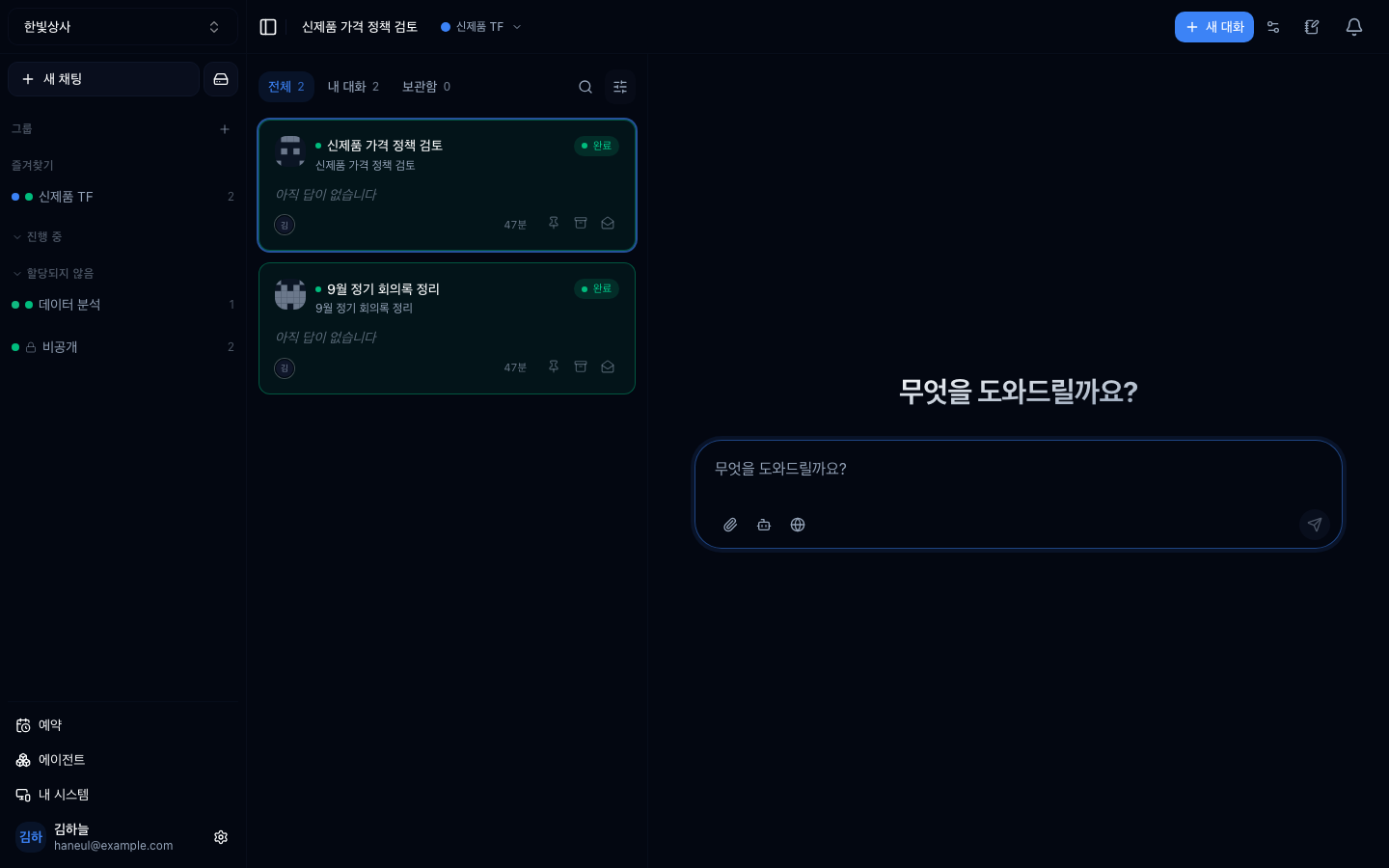
The thread list is on the left, **grouped into thread groups.** Anything not in a
group collects under **private** at the bottom. The input box is in the middle;
the icons beneath it are, from the left, attach file, pick an agent, and web
tools.
## One job = one conversation
A thread is **a conversation about one piece of work.** Write a request, get an
answer, and correcting it continues on top of that context.
[What you learned in “Your first try”](/guide/ai-first-try) applies directly — do not try
to finish in one shot; narrow it by exchanging.
## The answer appears in real time
You will see it appear character by character.
[That is not a visual effect — it is genuinely being produced that
way](/guide/ai-language-model).
## Tool use is visible
This is the difference from a consumer AI service.
```
You: How much A-1023 is left?
┌─ Tool call ─────────────────┐
│ check_stock("A-1023") │
│ → 47 (warehouse A: 30, B: 17)│
└──────────────────────────────┘
AI: There are 47 in stock.
30 in warehouse A and 17 in warehouse B.
```
**What was called and what came back are shown inside the conversation.**
### Why that matters
| | Tool calls hidden | Tool calls visible |
|---|---|---|
| Basis for the answer | unknowable | **you see where it came from** |
| When it is wrong | you do not know why | you see which step was wrong |
| Trust | judged by feel | verifiable |
When [hallucination](/guide/ai-hallucination) said "once an answer has a basis
you can verify it," this screen is what that meant.
## It keeps running after you close the window
Long-running work **continues even if you close the browser.**
```mermaid
graph TD
A["Request"] --> B["Processing starts"]
B --> C["Browser closed"]
C --> D["Continues on the server"]
D --> E["Come back and
the progress is there"]
```
So you can start something from your phone and check it at your desk, or start
it on the way home and see the result the next day.
## When to open a new thread
What you learned about [context](/guide/ai-context-window) applies directly.
| Situation | Verdict |
|---|---|
| The topic changed | **new thread** |
| An earlier attempt failed and you are changing direction | **new thread** |
| Answers are getting strange | **new thread** (the window may be full) |
| Continuing the same job | keep it |
**Do not be sparing with threads.** Opening one costs nothing, and a long
conversation is the more expensive option.
## When threads accumulate
As threads pile up in a workspace they get hard to find.
```
□ make titles recognisable (you can edit the auto-generated title)
□ tidy up finished work
□ turn frequent requests into agents
```
**The third is the key one.** If you are repeating the same request, that is
[a signal to build an agent](/guide/cn-agents-intro).
## Sharing with the team
Threads live inside the workspace, so **teammates can see them.** That is a big
difference from consumer services.
| Upside | Watch out |
|---|---|
| Nobody has to ask the same question twice | split workspaces for sensitive content |
| Good conversations serve as references | do not put personal data in conversations |
| Handover is easy | |
---
## Check yourself
**1. Why does showing tool calls in the conversation matter?**
Answer
**Because the answer's basis becomes visible.** You can see where a value came
from, which makes verification possible, and when something is wrong you can see
which step was wrong.
**2. When should you open a new thread?**
Answer
**When the topic changes, when an earlier attempt failed and you are changing
direction, and when answers start getting strange.** The last usually means the
context is full. Opening one costs nothing, and long conversations are more
expensive.
**3. What should you do if you are repeating the same request?**
Answer
**Treat it as a signal to build an agent.** Put the instruction into an agent and
you stop rewriting it every time.
---
Now create an account and go in →
[Creating an account and workspace](/guide/cn-signup)