이 장에서 배우는 것 메일로 에이전트를 부르는 구조, 주소가 만들어지는 규칙, 그리고 반드시 걸어야 할 제한.
에이전트마다 전용 메일 주소가 생깁니다. 그 주소로 메일을 보내면 에이전트가 읽고 답장합니다.
graph TD
  A["사람이 메일 발송"] --> B["에이전트 전용 주소"]
  B --> C["워크스페이스에 스레드 생성"]
  C --> D["에이전트가 처리"]
  D --> E["답장 발송"]
받은 요청은 워크스페이스 스레드로도 남습니다. 메일로 오갔지만 기록은 팀이 볼 수 있는 곳에 쌓입니다.
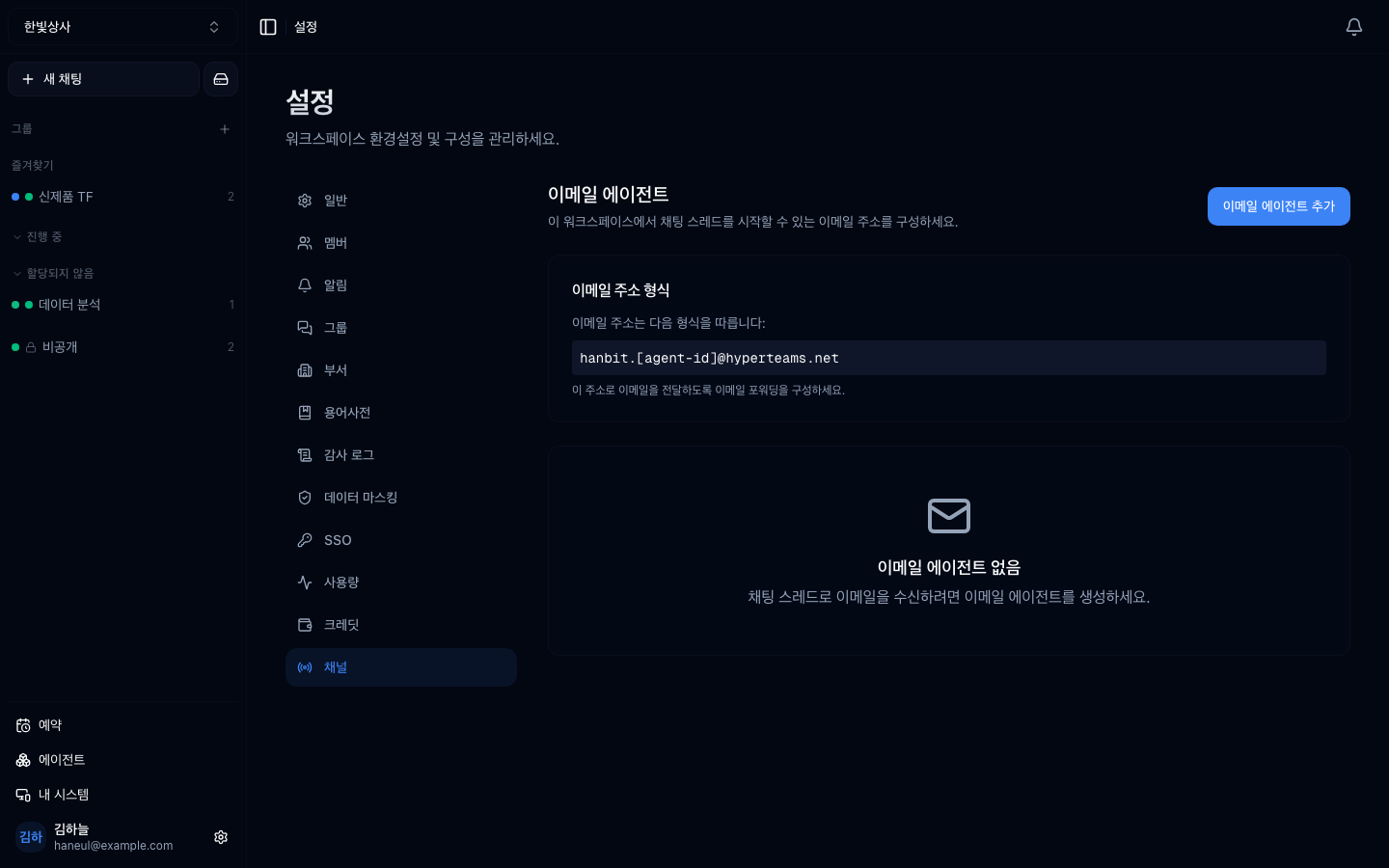
주소는 이렇게 만들어집니다.
예를 들어 핸들이 hanbit이면 이런 형태가 됩니다.
핸들이 앞에 오는 게 중요합니다. 이걸로 어느 워크스페이스인지 가려내기 때문에, 핸들을 나중에 바꾸면 기존 주소가 끊깁니다.
| 상황 | 왜 메일인가 |
|---|---|
| 현장·외부 담당자 | 계정 만들 필요 없이 평소 쓰던 메일로 |
| 정기 자료 접수 | 첨부를 보내면 알아서 처리 |
| 다른 시스템의 알림 | 알림 메일을 받아 요약·분류 |
| 사내 헬프데스크 | 문의 주소 하나로 접수 |
"계정을 안 만들어도 된다"가 가장 큰 이점입니다. 워크스페이스 멤버가 아닌 사람도 쓸 수 있습니다.
바로 그 이점이 위험이기도 합니다. 주소를 아는 누구나 보낼 수 있습니다.
그래서 두 가지 제한이 있습니다.
| 제한 | 뜻 |
|---|---|
| 보낸 사람 허용 목록 | 지정한 주소에서 온 것만 처리 |
| 도메인 허용 목록 | 지정한 도메인(예: 우리 회사)에서 온 것만 |
사내용이면 도메인 제한부터 거세요. 그것만으로도 대부분의 위험이 사라집니다. 외부 고객까지 받아야 한다면 도구를 좁히고 자동 답장을 끄는 쪽을 먼저 검토하세요.
자동 답장을 끄면 스레드는 만들되 답장은 보내지 않습니다.
| 자동 답장 | 쓰임 |
|---|---|
| 켜짐 | 바로 답이 필요한 문의 접수 |
| 꺼짐 | 접수만 하고 사람이 확인 후 답장 |
처음에는 꺼두고 시작하세요. 어떤 메일이 들어오고 에이전트가 어떻게 답하려 하는지 며칠 보고 나서 켜는 편이 안전합니다.
주소가 에이전트마다 생기므로 용도별로 나누는 게 자연스럽습니다.
각각 다른 도구와 다른 제한을 겁니다. 계약서 담당에 웹 검색이 필요 없고, 문의 담당에 사내 문서가 열려 있을 이유가 없습니다.
주소가 알려지면 스팸이 들어오고, 그것도 처리 비용을 씁니다.
메일 한 통으로 워크스페이스의 모든 도구가 열립니다. 채널은 바깥에서 들어오는 길이라는 점을 기억하세요.
지시문 없이 두면 사내 대화 톤으로 외부에 답장이 나갑니다. 추가 지시문에 톤과 길이를 적어두세요.
1. 이메일 에이전트의 가장 큰 이점과 그 이면의 위험은?
계정을 만들지 않아도 쓸 수 있다는 것이 이점이고, 바로 그래서 주소를 아는 누구나 보낼 수 있다는 것이 위험입니다. 보낸 사람 또는 도메인 허용 목록으로 막습니다.
2. 자동 답장을 처음에 꺼두는 이유는?
어떤 메일이 들어오고 에이전트가 어떻게 답하려 하는지 먼저 보기 위해서입니다. 접수와 스레드 생성은 되고 답장만 안 나가므로, 며칠 확인한 뒤 켜는 것이 안전합니다.
3. 워크스페이스 핸들을 나중에 바꾸면 무엇이 깨집니까?
기존 메일 주소가 끊깁니다. 주소가 <핸들>.<에이전트>@… 형태라 핸들로
워크스페이스를 가려내기 때문입니다.
웹사이트에 심는 창구입니다 → 채팅 위젯
<워크스페이스 핸들>.<에이전트 id>@<메일 도메인>hanbit.support@...hanbit.contract@...✗ 제한 없음 → 주소를 아는 누구나, 스팸도 처리됨 (비용도 씀)✓ 도메인 제한 → 사내 메일만✓ 주소 제한 → 정해진 담당자만hanbit.support@... → 문의 접수 담당 (도메인 제한 없음, 자동 답장 켬)hanbit.contract@... → 계약서 검토 담당 (사내 도메인만, 자동 답장 끔) HyperTeams