이 장에서 배우는 것 시스템을 등록한 뒤에 만나는 화면들 — 자리(슬롯), 주소, 태그, 그리고 무엇이 무료이고 무엇이 유료인지. 업무와 비용은 사용량 화면이 답합니다.
시스템 한 대가 자리 하나를 씁니다.
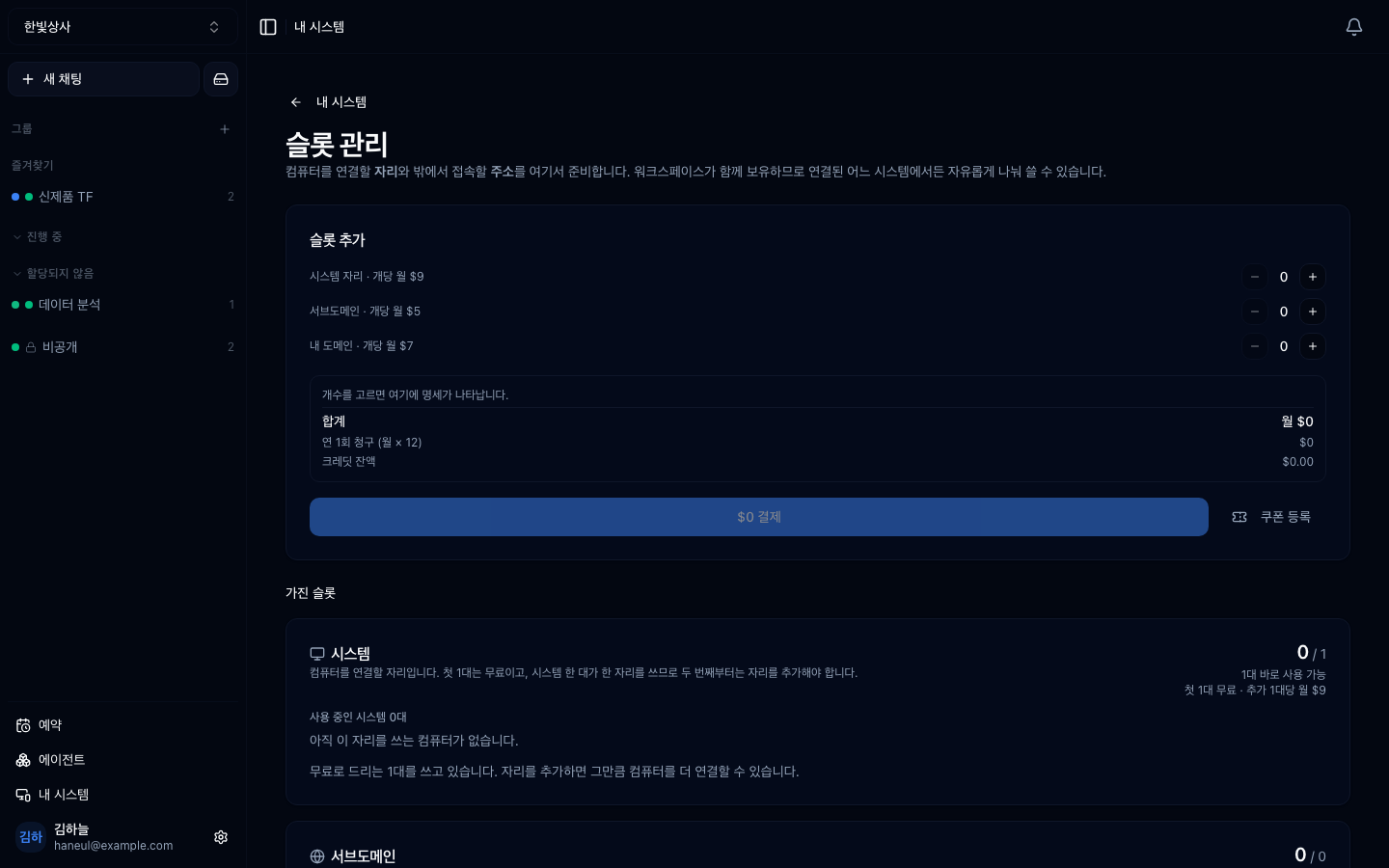
요금제에 포함된 대수까지는 자리를 사지 않아도 됩니다. 무료 등급 1대 · Plus 2대 · Pro 5대 · Max 10대이고, 그보다 더 붙일 때 자리를 추가합니다.
이 구조가 중요한 이유는 자리가 없으면 시스템이 대기 상태로 밀린다는 점입니다.
기다리는 동안 데이터는 사라지지 않습니다. 기록과 설정은 그대로 남고, 자리를 추가하면 곧바로 다시 연결됩니다.
바깥에서 그 컴퓨터에 닿는 주소도 자리를 씁니다. 종류가 둘입니다.
| 종류 | 뜻 |
|---|---|
| 서브도메인 | 바로 쓸 수 있게 제공되는 주소. 시스템에서 몇 번 클릭으로 생성 |
| 내 도메인 | 이미 가지고 있는 도메인을 연결 |
슬롯 하나가 주소 하나를 받칩니다. 서브도메인 슬롯과 내 도메인 슬롯은 별개라서, 서브도메인 슬롯이 남아도 내 도메인은 못 붙입니다.
시스템 연결하기에서 다뤘지만, 이 화면에서 헷갈리기 쉬워 정리합니다.
| 상태 | |
|---|---|
| 시스템 등록 | 무료 |
| 요금제에 포함된 대수만큼 연결 | 무료 (무료 등급도 1대) |
| 등록한 컴퓨터에 업무 맡기기 | 무료 |
| 진행 상황·사용량 보기 | 무료 |
| 포함분을 넘는 컴퓨터 | 자리 추가 (유료) |
| 외부 주소(터널) | 슬롯 (유료) |
폐쇄망(onprem) 설치본에는 자리도 공개 주소도 없습니다. 화면 자체가 나오지 않습니다 — 바깥으로 나가는 통로가 폐쇄망의 전제를 깨기 때문입니다.
시스템이 여러 대가 되면 태그로 묶습니다.
태그로 묶으면 "빌드 태그 중 하나"에 일을 맡기는 식이 가능해집니다. 어느 컴퓨터인지 지정하지 않아도 됩니다.
태그 기준은 "역할"입니다. 위치나 사양이 아니라, 무슨 일을 시킬 수 있는 컴퓨터인지로 묶으세요.
등록한 컴퓨터들에 내린 업무가 한곳에 모이는 자리는 사용량입니다(사이드바 아래). 거기서 기간을 고르면 어떻게 끝났는지(완료·중지·오류), 누가 시켰는지, 어느 컴퓨터가 얼마나 썼는지가 한 화면에 섭니다.
이 화면에 남는 것은 컴퓨터가 잘 붙어 있나 하나입니다 — 연결 상태, 가동률, 죽은 채 남은 세션, 그리고 자리(슬롯). 같은 집계를 두 화면이 각자 세면 기간이 어긋나는 날이 오고, 그때부터 두 숫자를 다 안 믿게 됩니다.
컴퓨터별 사용량이 따로 집계됩니다. 워크스페이스 사용량이 "무엇에 썼나"라면, 이쪽은 "어느 기계가 썼나"입니다.
두 번째가 비용에 직결됩니다. 안 쓰는 컴퓨터가 자리를 잡고 있으면 그만큼 비용입니다.
1. 자리가 부족하면 등록한 시스템은 어떻게 됩니까?
대기 상태로 밀립니다. 다만 기록과 설정은 그대로 남아 있어, 자리를 추가하면 곧바로 다시 연결됩니다.
2. 서브도메인 슬롯이 남아 있으면 내 도메인을 붙일 수 있습니까?
아니오. 서브도메인 슬롯과 내 도메인 슬롯은 별개입니다. 내 도메인을 붙이려면 그 종류의 슬롯이 있어야 합니다.
3. 태그를 나누는 기준은?
역할입니다. 위치나 사양이 아니라 무슨 일을 시킬 수 있는 컴퓨터인지로 묶어야, "빌드 태그 중 하나"처럼 지정 없이 맡길 수 있습니다.
요청을 쌓아두고 순서대로 돌립니다 → 예약 — 쌓아두고 시간에 맡기기
자리 1개 · 시스템 2대 등록→ 1대는 연결, 1대는 "자리를 기다리는 시스템"서브도메인 슬롯 2개 · 사용 중 1개 → 하나 더 만들 수 있음내 도메인 슬롯 0개 → 내 도메인은 못 붙임 (슬롯 추가 필요)빌드서버-1 [빌드]빌드서버-2 [빌드]개발PC-김 [개발]□ 한 대에만 몰려 있나 → 태그로 분산할 수 있나□ 오래 안 쓰인 시스템이 있나 → 자리를 비울 수 있나□ 등록된 시스템이 실제로 다 쓰이고 있나□ 자리를 기다리는 시스템이 있나 (있으면 방치 중인 것)□ 주소가 붙었는데 안 쓰는 것이 있나□ 태그가 실제 역할과 맞나 HyperTeams