이 장에서 배우는 것 채널이 무엇을 묶은 것인지, 네 가지가 각각 언제 맞는지.
지금까지는 워크스페이스 화면에서 대화했습니다. 그런데 실무에서는 화면에 들어오지 않는 사람도 있습니다.
채널은 그 사람들과 시스템이 들어오는 문입니다.
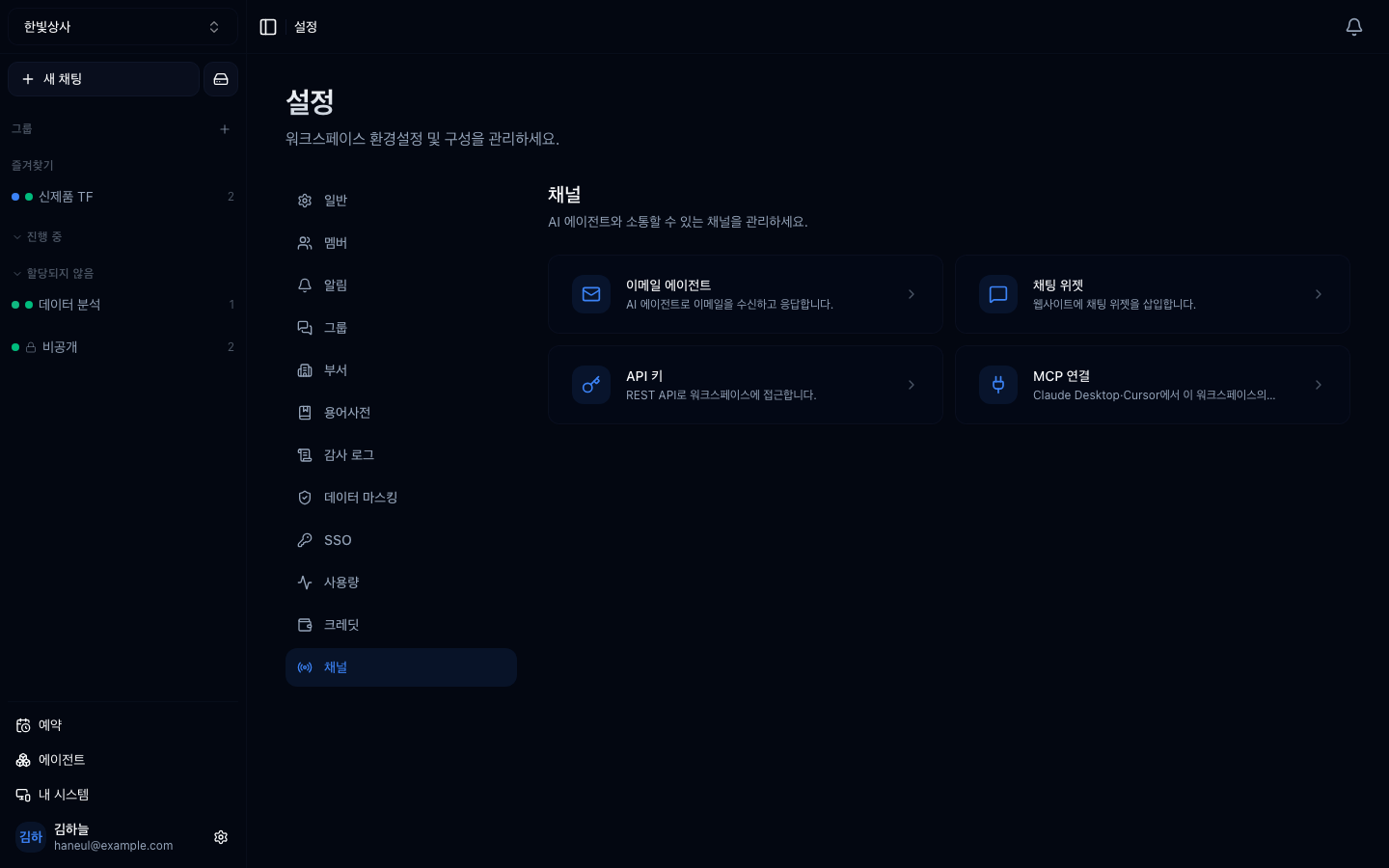
설정 → 채널 관리에 모여 있습니다.
graph TD
  A["채널"] --> B["이메일 에이전트<br/>메일을 보내면 답이 온다"]
  A --> C["채팅 위젯<br/>우리 웹사이트에 심는다"]
  A --> D["API 키<br/>다른 시스템이 부른다"]
A --> E["MCP<br/>외부 도구를 붙이거나 빌려준다"]API 문서는 채널이 아니라 설명서입니다. 채널 목록에는 없고 MCP 화면 안의 링크로 들어갑니다.
전부 "바깥에서 워크스페이스 안으로 들어오는 경로"라서입니다.
이게 중요한 이유는 보안 관점에서 같은 성격이기 때문입니다.
채널을 하나 열 때마다 이 셋을 정하게 되어 있습니다. 도구는 권한이라는 관점이 입구 쪽에도 그대로 적용됩니다.
넷 중 이메일·위젯은 설정 항목이 거의 같습니다.
"쓸 수 있는 도구"를 반드시 좁히세요. 바깥에서 들어오는 길이라, 워크스페이스의 모든 도구가 열려 있으면 위험합니다.
그 채널이 가리키는 자리(그룹)의 업무 목록입니다. 목록의 출처 필터에서 위젯·이메일· API 로 갈라 볼 수 있고, 카드를 누르면 손님이 받은 것만 보이는 응대 화면이 열립니다 — 조사 과정과 도구 결과가 섞이면 「이건 나간 말인가」를 매번 눈으로 가려야 하기 때문입니다. 전체 대화가 필요하면 머리글의 스위치로 한 걸음 갑니다.
자리를 안 정한 채널의 문의는 어느 자리에도 안 서고, 손님이 답을 기다릴 때 내 업무 → 내 차례에만 뜹니다. 그래서 자리 설정의 창구 줄이 그런 채널에 「자리 없음」을 적어 둡니다. 채널을 열 때 기본 그룹을 함께 정하세요.
graph TD
  Q["누가 들어오나?"] --> A{"우리 팀원인가?"}
  A -->|"예"| B["채널 불필요<br/>화면으로 충분"]
  A -->|"아니오"| C{"사람인가?"}
  C -->|"사람 · 메일"| D["이메일 에이전트"]
  C -->|"사람 · 웹"| E["채팅 위젯"]
  C -->|"시스템"| F["API 키"]
팀원이면 채널이 필요 없습니다. 채널은 계정이 없는 사람이나 시스템을 위한 것입니다.
두 번째가 핵심입니다. 워크스페이스에 사내 문서가 연결돼 있다면, 채널을 여는 순간 그 문서가 바깥 질문에 답하는 재료가 됩니다.
1. 채널 네 가지의 공통점은?
전부 바깥에서 워크스페이스 안으로 들어오는 경로입니다. 그래서 보안 관점에서 성격이 같고, 열 때마다 "누가 들어오나 · 어느 에이전트에 닿나 · 어떤 도구를 쓰나" 셋을 정하게 되어 있습니다.
2. 팀원에게는 왜 채널이 필요 없습니까?
워크스페이스 화면으로 들어오면 되기 때문입니다. 채널은 계정이 없는 사람 (고객·외부 담당자)이나 시스템을 위한 것입니다.
3. 채널을 열 때 도구를 좁혀야 하는 이유는?
바깥에서 들어오는 길이기 때문입니다. 워크스페이스의 모든 도구가 열려 있으면 외부 요청이 그 전부를 쓸 수 있게 됩니다.
먼저 이메일부터 봅니다 → 이메일 에이전트
□ 누가 들어올 수 있나□ 어느 에이전트에 닿나□ 어떤 도구를 쓸 수 있나□ 이 채널로 들어온 요청이 어느 자료에 닿나□ 그 자료를 바깥 사람이 봐도 되나□ 도구를 좁혔나□ 누가 보낼 수 있는지 제한했나 (이메일·위젯은 제한 설정이 있습니다) HyperTeams