이 장에서 배우는 것 SSO 가 여는 것이 로그인만이 아니라는 것, IdP 그룹을 부서에 잇는 법, 그리고 왜 이것이 보안 심사 통과 조건인지.
설정 → SSO 화면은 두 가지를 다룹니다.
| 무엇 | 어디서 정하나 | |
|---|---|---|
| 로그인 | 사내 계정으로 들어오기 | 배포 단위 설정 (OIDC_*) |
| 부서 동기화 | IdP 그룹 → 부서 | 이 화면 |
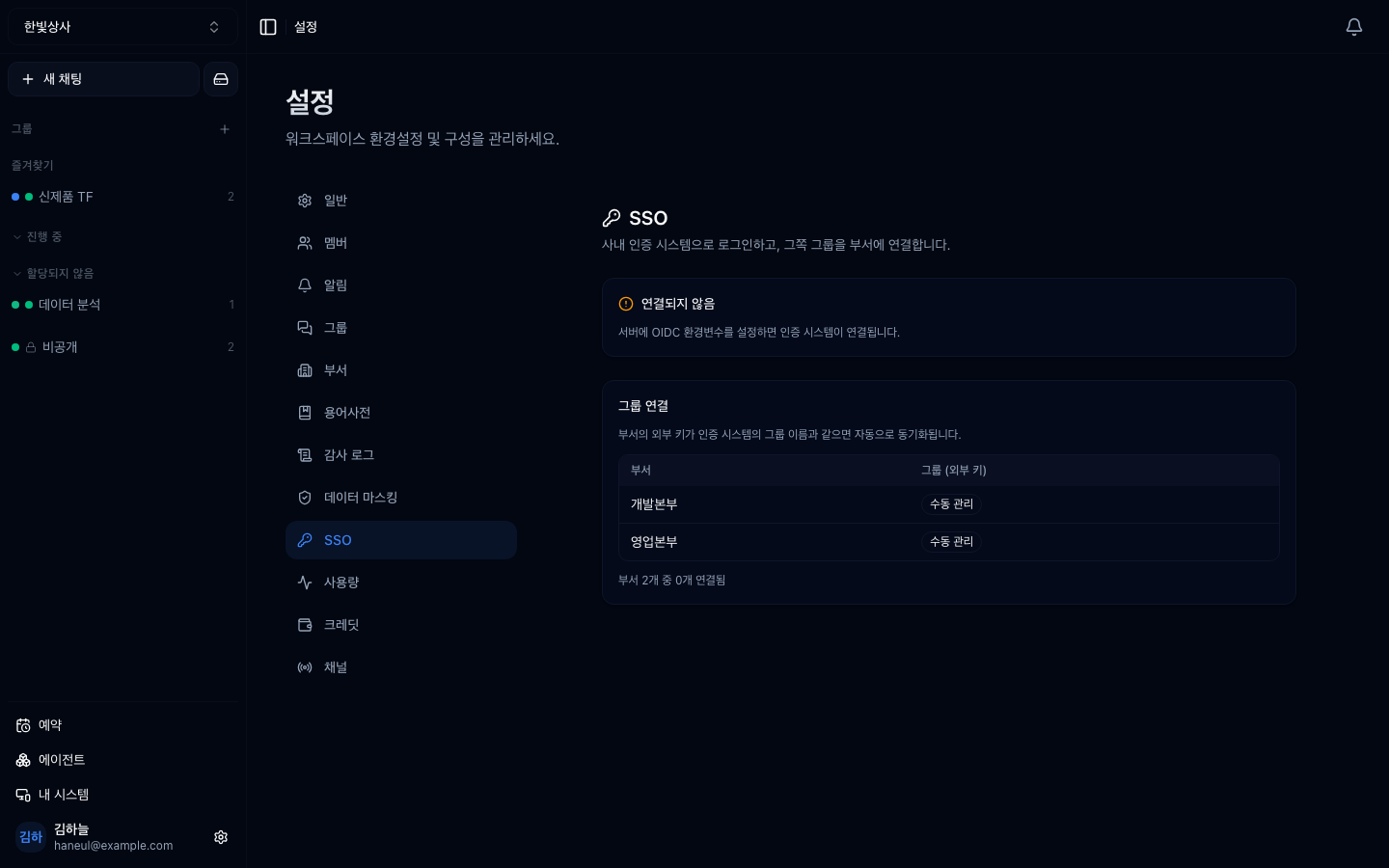
로그인 자체는 배포를 운영하는 쪽이 붙입니다. 워크스페이스가 실제로 얻는 값은 아래쪽입니다 — 사람이 들어올 때마다 소속 부서가 자동으로 맞춰지는 것.
부서는 이 제품에서 권한을 주는 단위입니다.
드라이브 폴더 권한 → 부서로대화 그룹 공개 범위 → 부서로작업자(즉시 실행) 권한 → 부서로이걸 개인으로 지정해 두면 인사 이동이 있을 때마다 화면 수십 곳을 손으로 고쳐야 합니다. 부서로 지정하고 부서가 IdP 를 따라오면, 인사팀이 IdP 에서 한 번 옮기는 것으로 끝납니다.
퇴사자 처리도 같습니다. IdP 에서 비활성화하면 다음 로그인부터 막히고, 부서 소속도 함께 사라집니다.
화면에는 IdP 가 붙었는지, 어느 클레임에서 그룹을 읽는지가 표시됩니다.
그 아래에서 부서마다 외부 키를 적습니다. IdP 가 보내는 그룹 이름과 같아야 이어집니다.
| 부서 | 외부 키 |
|---|---|
| 영업본부 | sales |
| 개발본부 | engineering |
대소문자와 공백까지 그대로 맞추세요. 한 글자만 달라도 조용히 안 이어지고, 증상은 "권한이 없다"로 나타납니다.
Max 등급 기능입니다(요금제와 등급).
기능 가치가 아니라 보안 심사 통과 조건이라는 점이 이 항목의 성격입니다. "사내 계정 체계 밖에서 별도 비밀번호를 만들어야 하느냐"는 대기업 심사에서 거의 반드시 나오는 질문이고, 여기서 막히면 나머지 기능은 검토조차 안 됩니다.
등급 제한이 없습니다. 다만 IdP 자체는 그 망 안에 있어야 합니다.
배포 설정에 따릅니다. 이 화면은 부서 동기화를 다루고, 로그인 수단을 켜고 끄는
것은 배포 단위(OIDC_*)입니다. 전환기에는 둘을 함께 열어 두는 것이 보통입니다.
아닙니다. 이미 있는 부서에 외부 키만 적어 주면 됩니다. IdP 에 없는 부서는 그대로 손으로 관리하면 되고, 둘을 섞어 쓸 수 있습니다.
1. 이 화면에서 워크스페이스가 실제로 얻는 것은?
IdP 그룹이 부서 소속이 되는 동기화입니다. 로그인 자체는 배포 단위 설정이고, 이 화면이 다루는 것은 그 아래쪽입니다.
2. 부서 동기화가 왜 권한 관리를 싸게 만듭니까?
드라이브·그룹·작업자 권한을 전부 부서로 주기 때문입니다. 인사팀이 IdP 에서 한 번 옮기면 그 사람의 접근 범위가 전부 따라 바뀝니다.
3. 외부 키가 한 글자 다르면 어떤 증상이 납니까?
조용히 안 이어집니다. 오류가 아니라 "권한이 없다"로 나타나서 원인을 찾기 어렵습니다. 대소문자와 공백까지 맞추세요.
다음은 막혔을 때 볼 곳입니다 → 문제 해결
□ 연결 상태 — 붙었는가□ issuer 주소 — 어느 IdP 인가□ 그룹 클레임 이름 — 기본값은 groups HyperTeams