이 장에서 배우는 것 스레드가 무엇이고, 도구 호출이 어떻게 보이고, 왜 창을 닫아도 되는지.
스레드는 하나의 일에 대한 대화입니다. 요청을 적으면 답이 오고, 이어서 고쳐 말하면 그 맥락 위에서 진행됩니다.
「처음 써보기」에서 익힌 것이 그대로 적용됩니다 — 한 번에 끝내려 하지 말고 주고받으며 좁혀갑니다.
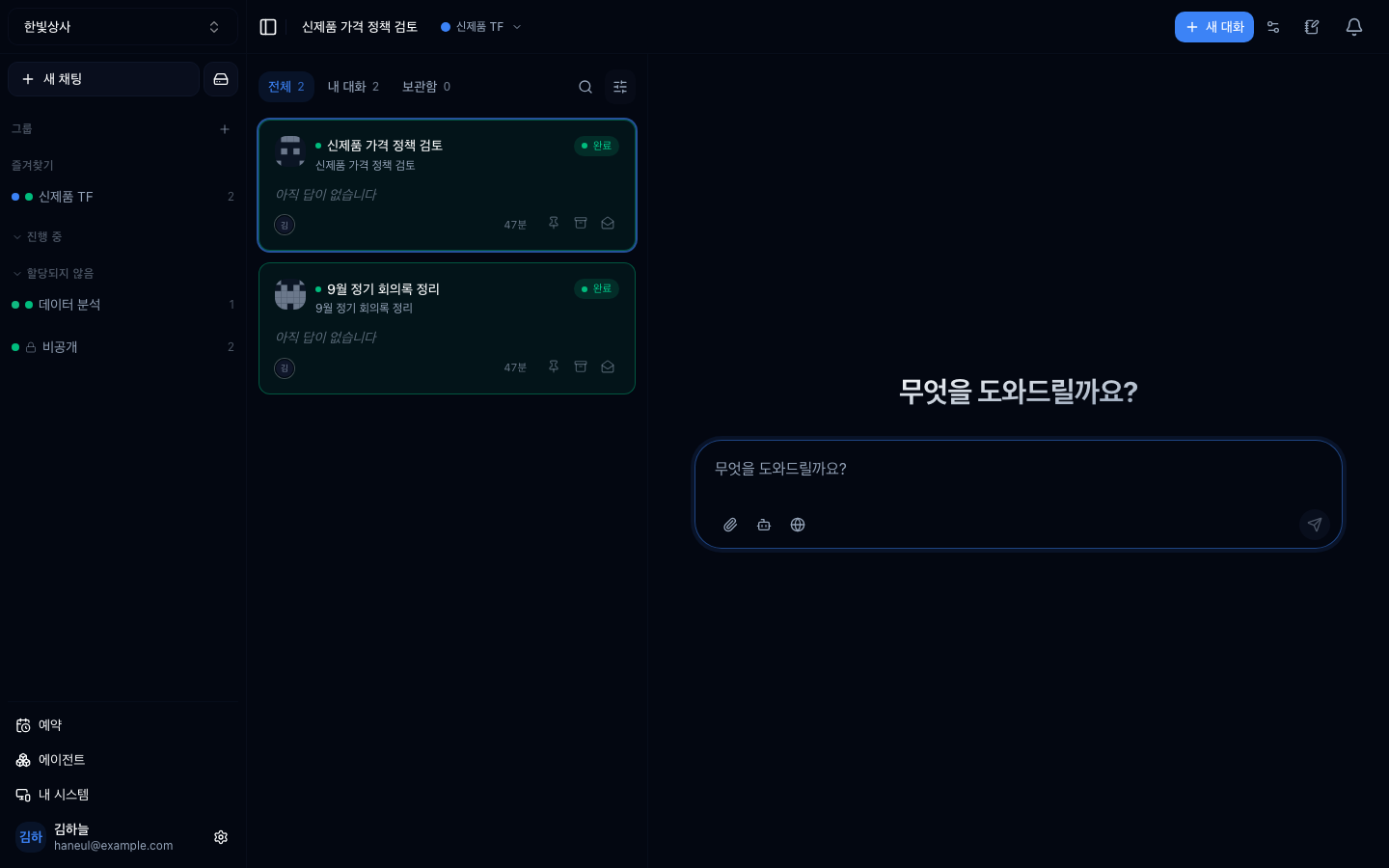
왼쪽이 스레드 목록이고 대화 그룹으로 묶여 있습니다. 그룹에 속하지 않은 것은 맨 아래 내 업무로 모입니다. 오른쪽 가운데가 입력창이고, 아래 아이콘은 왼쪽부터 파일 첨부 · 에이전트 선택 · 웹 도구입니다.
한 글자씩 나타나는 걸 보게 됩니다. 연출이 아니라 실제로 그렇게 만들어지고 있는 것입니다.
이게 개인용 AI 서비스와 다른 점입니다.
무엇을 호출했고 무엇이 돌아왔는지가 대화 안에 함께 표시됩니다.
| 도구 호출이 안 보이면 | 보이면 | |
|---|---|---|
| 답의 근거 | 알 수 없음 | 어디서 왔는지 보임 |
| 틀렸을 때 | 왜 틀렸는지 모름 | 어느 단계에서 틀렸는지 |
| 신뢰 | 감으로 판단 | 확인 가능 |
환각을 다룰 때 "답에 근거가 생기면 검증할 수 있다"고 한 것이 이 화면입니다.
오래 걸리는 일은 브라우저를 닫아도 계속 진행됩니다.
graph TD
  A["요청"] --> B["처리 시작"]
  B --> C["브라우저 닫음"]
  C --> D["서버에서 계속 진행"]
  D --> E["다시 들어오면<br/>그동안의 진행이 그대로"]
폰으로 걸어두고 자리에서 확인하거나, 퇴근길에 시작해서 다음 날 결과를 보는 식이 됩니다.
컨텍스트에서 배운 것이 그대로 적용됩니다.
| 상황 | 판단 |
|---|---|
| 주제가 바뀜 | 새 스레드 |
| 앞의 시도가 실패해서 방향을 바꿈 | 새 스레드 |
| 답이 점점 이상해짐 | 새 스레드 (창이 찼을 가능성) |
| 같은 일을 이어감 | 유지 |
스레드를 아끼지 마세요. 새로 여는 데 비용이 들지 않고, 오히려 긴 대화가 더 비쌉니다.
워크스페이스에 스레드가 쌓이면 나중에 찾기가 어려워집니다.
세 번째가 핵심입니다. 같은 요청을 반복하고 있다면 그건 에이전트로 만들 신호입니다.
스레드는 워크스페이스 안에 있으므로 팀원이 볼 수 있습니다. 이게 개인용 서비스와의 큰 차이입니다.
| 좋은 점 | 주의할 점 |
|---|---|
| 같은 질문을 각자 안 해도 됨 | 민감한 내용은 워크스페이스를 나누기 |
| 잘 된 대화를 참고 가능 | 대화에 개인정보를 넣지 않기 |
| 인수인계가 쉬움 |
1. 도구 호출이 대화에 표시되는 게 왜 중요합니까?
답의 근거가 보이기 때문입니다. 어디서 온 값인지 알 수 있어 검증이 가능하고, 틀렸을 때 어느 단계에서 틀렸는지 알 수 있습니다.
2. 언제 새 스레드를 열어야 합니까?
주제가 바뀌었을 때, 앞의 시도가 실패해서 방향을 바꿀 때, 답이 점점 이상해질 때 입니다. 마지막은 컨텍스트가 찼을 가능성이 큽니다. 새로 여는 데 비용이 들지 않고 오히려 긴 대화가 더 비쌉니다.
3. 같은 요청을 반복하고 있다면 무엇을 해야 합니까?
에이전트로 만들 신호입니다. 지시문을 에이전트에 담아두면 매번 다시 쓰지 않아도 됩니다.
이제 계정을 만들고 실제로 들어가 봅니다 → 계정과 워크스페이스 만들기
나: A-1023 재고 얼마나 남았어? ┌─ 도구 호출 ──────────────┐ │ 재고조회("A-1023") │ │ → 47개 (창고 A: 30, B: 17)│ └──────────────────────────┘AI: 현재 47개 남아 있습니다. 창고 A에 30개, 창고 B에 17개입니다.□ 제목을 알아볼 수 있게 (자동 생성된 제목을 고칠 수 있습니다)□ 끝난 일은 정리□ 자주 쓰는 요청은 에이전트로 만들기 HyperTeams