이 장에서 배우는 것 스킬이 지시문·에이전트와 무엇이 다른지, 어디에 놓이는지, 그리고 언제 만들지.
지금까지 "반복을 줄이는 법"이 세 번 나왔습니다. 헷갈리기 쉬워서 정리합니다.
| 단위 | 어디에 | 무엇을 담나 |
|---|---|---|
| 지시문 템플릿 | 내 메모장 | 매번 붙여넣는 글 |
| 서브 에이전트 | Connect 워크스페이스 | 역할·말투·규칙 |
| 스킬 | 작업 폴더 안의 파일 | 절차와 그에 딸린 자료 |
스킬의 차이는 파일로 존재한다는 점입니다.
스킬은 데이터베이스에 저장되지 않습니다. 폴더를 훑어서 발견합니다.
이 설계의 결과가 중요합니다.
| 결과 | 뜻 |
|---|---|
| git으로 관리됩니다 | 팀이 공유하고, 이력이 남고, 되돌릴 수 있음 |
| 터미널에서도 보입니다 | 화면으로 시키든 직접 치든 같은 스킬 |
| 폴더를 복사하면 따라옵니다 | 다른 프로젝트로 옮기기 쉬움 |
첫 줄이 핵심입니다. 지시문을 개인 메모에 두면 그 사람 것이지만, 스킬은 저장소에 들어가 팀의 자산이 됩니다.
description이 가장 중요합니다모델은 이 한 줄을 읽고 이 스킬을 쓸지 판단합니다. MCP 도구 설명과 완전히 같은 원리입니다.
"언제 쓰는지"를 반드시 넣으세요. 그게 없으면 안 불립니다.
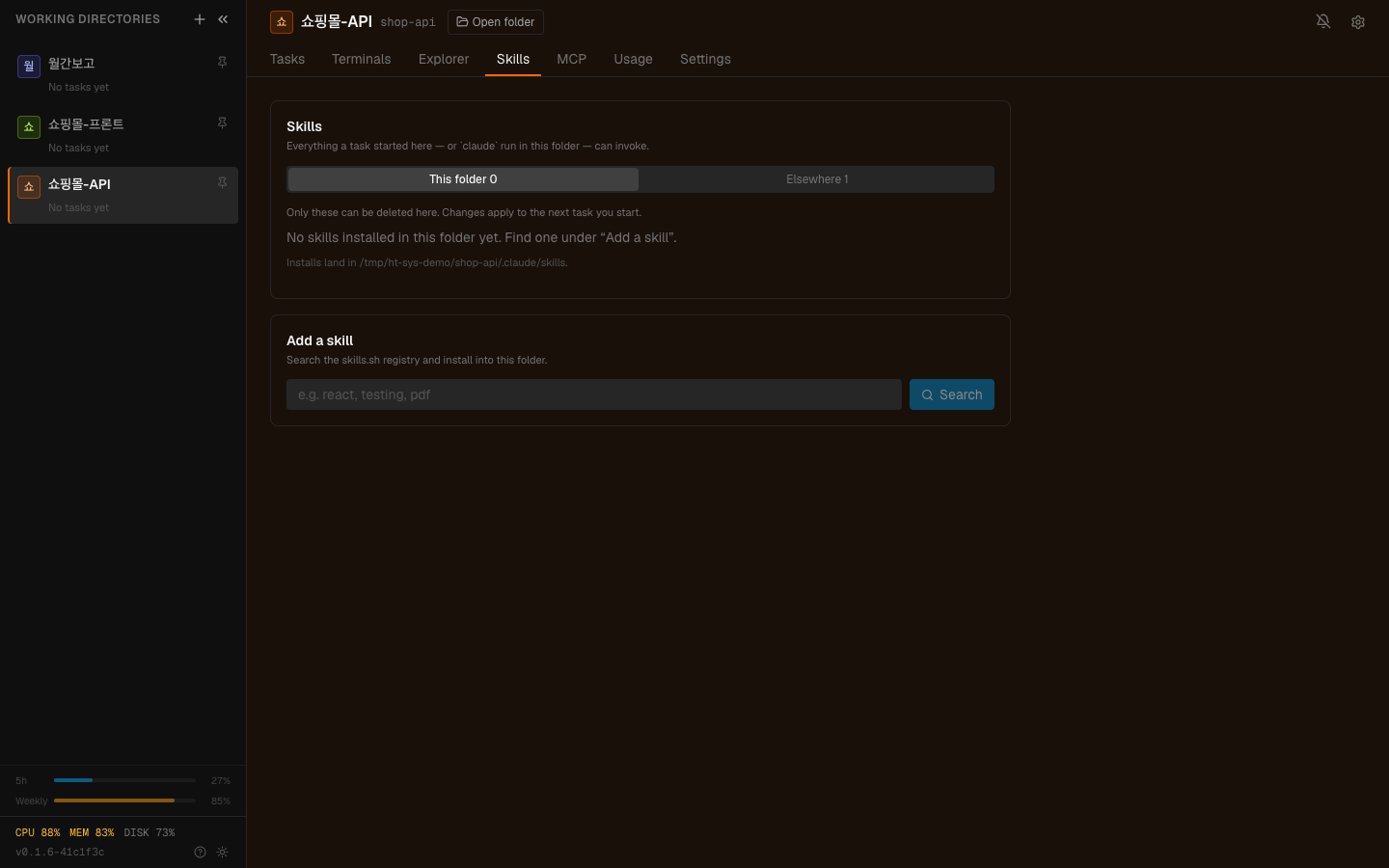
사이드바 머리의 ⋯ → 도구 탭입니다. 이 폴더의 도구와 엔진에 기본 포함된 것을 나눠 보여주고, 설치 경로도 함께 적혀 있습니다 — 편집할 수 있는 것은 이 폴더의 것뿐입니다. 새 스킬은 같은 탭 아래의 도구 추가에서 찾아 설치합니다.
스킬은 네 군데에서 발견됩니다. 읽기는 넷 다, 쓰기는 하나뿐입니다.
| 자리 | 범위 | 편집 |
|---|---|---|
| project | 이 작업 폴더에서만 | 여기만 편집합니다 |
| user | 내 모든 프로젝트 | 읽기만 |
| policy | 관리자가 설치한 것 | 읽기만 |
| plugin | 플러그인이 가져온 것 | 읽기만 |
화면에서 설치·삭제하면 <작업 폴더>/.claude/skills에만 손댑니다. 나머지
셋은 이 기계·관리자·플러그인의 것이라 목록에만 나오고 건드리지 않습니다.
그래서 스킬을 만들 때는 project 자리에 만듭니다. 그러면 그 폴더의 저장소에 들어가 팀이 함께 씁니다.
graph TD
  A["같은 일을 반복한다"] --> B{"매번 지시문이<br/>거의 같은가?"}
  B -->|"아니오"| C["그냥 대화로"]
  B -->|"예"| D{"딸린 자료가<br/>있는가?"}
  D -->|"없음"| E["에이전트 또는 템플릿"]
  D -->|"있음"| F["스킬"]
  B -->|"예"| G{"팀이 함께 쓰나?"}
  G -->|"예"| F
스킬이 맞는 신호 셋입니다.
세 번째가 특히 스킬다운 경우입니다. "배포 점검"은 프로젝트마다 확인할 것이 다른데, 스킬이 작업 폴더 안에 있으니 각 프로젝트가 자기 버전을 가집니다.
| 상황 | 대신 |
|---|---|
| 한 번 쓰고 말 것 | 그냥 대화로 |
| 지시가 매번 크게 달라짐 | 대화로 좁혀가기 |
| 팀 전체가 쓰는 말투·역할 | Connect 서브 에이전트 |
| 외부 시스템을 부르는 것 | MCP 도구 |
스킬은 절차이지 도구가 아닙니다. 무언가를 조회하거나 실행해야 하면 그건 도구 쪽입니다.
범위는 하지 말 것으로 적는 게 효과적이라는 원칙이 스킬에서도 그대로입니다. 특히 스킬은 여러 사람이 쓰므로 경계가 더 중요합니다.
name을 맞추세요프론트매터의 name이 폴더 이름과 달라도 동작은 합니다. 다만 파일을 다룰 때는
폴더 이름이 기준이라, 다르면 지우거나 옮길 때 헷갈립니다. 맞춰두세요.
분기에 한 번쯤:
세 번째가 스킬 특유의 문제입니다. 절차가 바뀌었는데 스킬이 그대로면 틀린 절차를 자신 있게 반복합니다.
1. 스킬이 지시문 템플릿과 다른 결정적인 점은?
파일로 작업 폴더 안에 존재한다는 것입니다. 그래서 git으로 관리되고 팀이 공유하며, 화면에서 시키든 터미널에서 직접 치든 같은 스킬이 보입니다.
2. description에 반드시 넣어야 하는 것은?
언제 쓰는지입니다. 모델이 그 한 줄을 읽고 부를지 판단하므로, "무엇을 하는가"만 있고 "언제"가 없으면 불리지 않습니다.
3. 네 개의 자리 중 편집할 수 있는 곳은 어디이고 왜입니까?
project(작업 폴더 안)뿐입니다. 나머지 셋(user·policy·plugin)은 이 기계· 관리자·플러그인의 것이라 목록에만 나오고 건드리지 않습니다.
문서를 자료로 바꾸는 법을 봅니다 → 문서를 자료로 바꾸기
<작업 폴더>/.claude/skills/ 배포점검/ SKILL.md 보고서양식/ SKILL.md 템플릿.md---name: 배포점검description: 배포 전에 확인할 것들을 순서대로 점검합니다. 배포·릴리스 전에 씁니다.---# 배포 점검## 순서1. 테스트가 전부 통과하는지 확인2. 빌드가 성공하는지 확인3. 변경된 파일 목록을 요약4. 되돌리기 어려운 변경이 있으면 별도로 표시## 확인할 것- 마이그레이션 파일이 포함됐나- 환경변수가 추가됐나 (배포처에 반영 필요)- 외부 API 호출이 추가됐나## 하지 말 것- 실제 배포는 하지 않습니다. 점검과 보고까지입니다.✗ description: 배포 점검 → 언제 쓰는지 모름✓ description: 배포 전에 확인할 것들을 순서대로 점검합니다. 배포·릴리스 전에 씁니다. → 무엇을 하고 언제 쓰는지가 들어 있음□ 지시문에 딸린 자료가 있다 (양식, 체크리스트, 예시 파일)□ 팀이 함께 써야 한다□ 프로젝트마다 내용이 달라진다## 하지 말 것- 실제 배포는 하지 않습니다. 점검과 보고까지입니다.보고서양식/ SKILL.md 템플릿.md ← 이걸 참고하라고 SKILL.md 에 적기 예시-잘된것.md□ 최근에 한 번도 안 불린 스킬이 있나□ description 이 "언제 쓰는지" 를 말하고 있나□ 프로젝트가 바뀌었는데 스킬이 옛 절차를 담고 있지 않나 HyperTeams